Google Pay Per Click (PPC) advertising is a simple way to put your business in front of people actively searching for what you offer—and you only pay when someone clicks your ad. This targeted approach helps you attract visitors who are ready to take action, making your advertising budget work smarter. If you’re a small business owner feeling overwhelmed by PPC, this guide will walk you through how it works, how to set up your first campaign step-by-step, and how to get the best results without confusion or wasted spend.
What exactly is Google Pay Per Click advertising and why should I care?
Google Pay Per Click advertising lets you place ads on Google’s search results and other Google sites, and you pay only when someone clicks your ad. Think of it as renting a spot on Google’s page that’s shown to people already looking for products or services like yours. Google runs an auction each time someone searches, and your ad’s placement depends on your bid and how relevant your ad is to the search. This means you can start getting visitors as soon as your campaign is live, unlike organic search results that take time to grow. For a small business, this quick, targeted exposure can be a game-changer in reaching local customers or online buyers ready to make a decision.
How do I create my first Google PPC campaign without getting lost?
Starting your first campaign is easier when you follow clear steps. First, sign in to your Google Ads account (you’ll need a Google account). Click 'New Campaign' and pick your goal—usually 'Sales' or 'Website Traffic.' Next, choose where your ads will appear by selecting countries, regions, or cities, which is especially useful if you serve a local area. Then choose the campaign type; 'Search' ads are a good place to start because they appear on Google’s search results. After that, create an ad group around a specific theme or product, and add keywords that potential customers might use to find you. Write your ad next—make it clear what you offer and include a call to action like "Call now" or "Learn more." Finally, set a daily budget that fits your comfort level and review everything before launching. Google’s step-by-step interface helps guide you, so take it one step at a time to avoid feeling overwhelmed.
Which keywords should I bid on to get the best results?
Choosing the right keywords is key because they decide when your ads show. Put yourself in your customers’ shoes: what exact words or phrases would they type when looking for your product or service? Focus on keywords that show clear intent—people ready to buy or learn more. For example, if you sell handmade candles, "buy handmade candles" or "scented candles online" are better than just "candles." Avoid broad, general keywords like "gifts" or "decor" since they attract less targeted clicks and can quickly drain your budget. Use Google’s Keyword Planner or free tools to find related keywords and see approximate costs. Also, add negative keywords—terms you don’t want your ads to show for—to avoid wasting money. For instance, if you don’t sell wholesale, adding "wholesale" as a negative keyword stops your ads from appearing in those searches.
How do bidding and budgets really work on Google Ads?
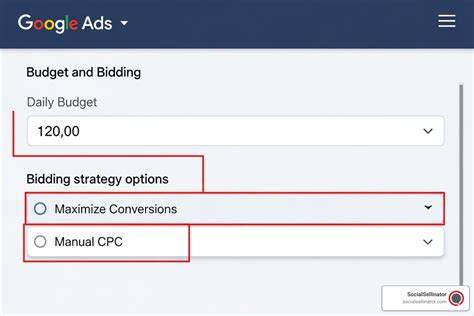
Bidding means telling Google the most you’re willing to pay for a click on your ad. But you rarely pay your full bid; usually, you pay just enough to beat the next highest bidder. Your daily budget sets the maximum amount Google can spend on your campaign each day, helping you control costs. Another important factor is Quality Score—a rating Google gives your ads based on how relevant and useful they are to the searcher. A higher Quality Score can lower your cost per click and improve your ad’s position. So, bidding high alone isn’t enough; your ads and keywords need to closely match what people are searching for. If your ads aren’t relevant, you’ll either pay more or show less often. Starting with modest bids and budgets and adjusting based on results makes managing your campaign easier.
What makes an effective ad that actually gets clicks?
Ads that get clicks speak directly to what the searcher needs without sounding pushy or salesy. Start with a clear headline that matches your keywords so people know your ad is relevant. Use simple language to explain what you offer and what makes you different. Include a call to action like "Order today," "Get a free quote," or "Visit our store" so people know what to do next. Avoid jargon or exaggerated claims that might turn people away. For example, instead of "Best candles in the world," say "Handmade scented candles delivered fast." Trying different versions of your ad helps you find what works best. The goal is to attract clicks from people genuinely interested in your business, not just any clicks.
How do I measure if my campaign is working or wasting money?
To see if your campaign is successful, track key numbers like click-through rate (CTR), which shows the percentage of people who see your ad and click it. A low CTR usually means your ad or keywords aren’t relevant enough. Even more important is conversion tracking—measuring what happens after someone clicks, like making a purchase, signing up, or calling your business. Setting up conversion tracking in Google Ads or Google Analytics lets you see if your ads bring real results, not just traffic. Watch your cost per conversion to know if you’re spending wisely. If you get clicks but no conversions, your landing page or offer might need improvement. Regularly checking these numbers helps you decide what to change and where to focus your budget.
How can I optimize my campaigns once they’re running?
Optimization means making small changes to improve your results without increasing your spend. Look at which keywords bring sales and which don’t. Pause or lower bids on keywords that cost a lot but don’t convert, and increase bids on terms that do well to get more visibility. Test different ad copies to see which messages get more clicks or conversions. Use ad scheduling to show your ads during your busiest hours or days when customers are most likely to act. Keep an eye on your Quality Score and improve your ad relevance and landing page experience if needed. Adding negative keywords as you find unrelated searches helps prevent wasted spend. Small, regular adjustments add up to better performance over time.
What common mistakes do beginners make that I should avoid?
Some mistakes can waste your money and slow down your progress. One is ignoring negative keywords, which means your ads might show to people who aren’t your target customers. Another is setting budgets too low to gather useful data—you need enough spend to see what works. Writing ads that are too vague or too salesy can hurt your click rates. Neglecting mobile users is another issue since many searches happen on phones; make sure your ads and landing pages work well on smaller screens. Lastly, rushing to scale up without testing can waste your budget. Taking time to learn, test, and adjust before increasing your budget will pay off.
Are there any advanced tips or tools that can help me get better results?
Once you’re comfortable with the basics, some features can boost your campaigns. Ad extensions let you add extra info to your ads, like phone numbers, your location, or links to specific pages—making your ad larger and more useful. Audience targeting helps you focus on people based on interests, past visits, or demographics, making ads more relevant. Automated bidding lets Google adjust your bids to meet goals like maximizing conversions within your budget, saving you time. Using Google Analytics alongside your ads gives deeper insights into what visitors do after clicking. These tools add some complexity but can improve your results once you’re ready to explore them.
What’s the best next step to take after reading this guide?
Now is a great time to create your Google Ads account and start your first campaign using the steps here. Keep your daily budget small at first—around $10 to $20—so you can learn without pressure. Focus on a few targeted keywords that show clear buyer intent, and write simple, clear ads that explain your offer. Set up basic conversion tracking to see what’s working. Don’t worry if it’s not perfect right away; the key is to start, watch your results, and make small changes as you learn. With each adjustment, you’ll get more comfortable and start seeing real visitors coming to your business.
Conclusion
Start your first Google Pay Per Click campaign with clear goals and focus on the right keywords and ad copy. Avoid trying to bid on every keyword or rushing with a big budget before you understand what works. Good results look like steady clicks from interested people and conversions that make your spend worthwhile. Remember, PPC is a learning process—taking small steps, tracking consistently, and making thoughtful tweaks will help your business reach the right customers without wasting money.
Frequently Asked Questions
How much should I budget for my first Google PPC campaign?
Begin with a daily budget you’re comfortable with, like $10 to $20 per day. This lets you collect useful data and learn what works without risking too much money. You can increase the budget later once you see good results.
Can I run Google PPC ads for a local business only?
Yes, you can target your ads to specific locations such as cities or regions. This ensures your ads reach people near your business, making your budget more efficient and your ads more relevant.
What if my ads aren’t getting clicks?
If you’re not getting clicks, check whether your keywords match what your customers search for and if your ad clearly explains your offer. Improving relevance with more specific keywords and writing straightforward ads usually helps increase clicks.
Do I need a website to use Google PPC?
Having a website is highly recommended because it gives potential customers a place to learn more and take action after clicking your ad. If you don’t have one yet, you can use options like call-only ads or link to a social media page, but a website offers more flexibility and better tracking.
How often should I check and adjust my campaign?
Check your campaign’s performance at least once a week, especially when starting out. Regular reviews help you spot what’s working and what isn’t, so you can make small changes to improve results without overspending.