If you’ve started using Google Ads but aren’t seeing the results you want, it often comes down to a few common mistakes that waste your money and effort. Avoiding these pitfalls—like setting up proper tracking, choosing the right keywords and match types, writing ads that match what users want, structuring campaigns clearly, and regularly managing your bids and budgets—will help you get better results. This guide walks you through those key areas so you can spend smarter and attract the right customers without frustration.
Why am I not seeing good results from my Google Ads?
Poor results usually stem from familiar problems: unclear goals, missing or incorrect tracking, choosing keywords that don’t match your audience, ads that don’t connect with search intent, messy campaign structures, and not adjusting bids or budgets as needed. If you’re not getting clicks or conversions, it often means your ads aren’t relevant to what potential customers want, or you can’t measure what’s working. Many beginners treat Google Ads like a set-it-and-forget-it tool, but it needs ongoing attention. Fixing even one of these issues can improve your results significantly, and tackling several will make a real difference.
Am I tracking the right things to measure success?
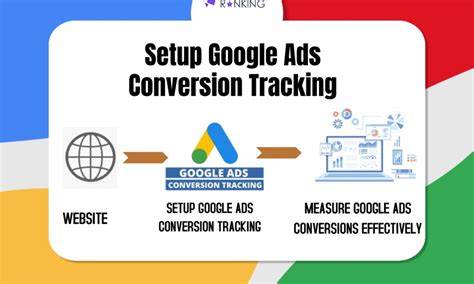
Without solid tracking, you’re guessing if your ads work. Conversion tracking is essential—it shows which clicks lead to valuable actions like sales, sign-ups, or calls. Connecting Google Ads to Google Analytics adds insight into what visitors do after clicking: which pages they visit, where they drop off, and more. For example, if you only track clicks but not form completions, you might pay for visitors who never become customers. Tracking even simple goals like newsletter signups helps you understand what drives engagement and lets you optimize effectively. Setting up proper conversion goals is the foundation for managing bids, budgets, and overall campaign success.
How do I pick keywords without wasting money?
Choosing the right keywords is critical. Broad terms like “shoes” attract lots of traffic but often from people who won’t buy, draining your budget. Instead, focus on specific, intent-driven keywords such as “women’s running shoes size 8.” Using match types correctly—phrase, exact, or broad match modifier—gives you control over who sees your ads. Broad match can show your ads for unrelated searches, while exact match narrows exposure but increases relevance. Keyword research tools help find terms your audience actually searches for. Careful keyword selection ensures you pay for clicks that are more likely to convert.
Why do my ads feel irrelevant or get low clicks?
Ads that don’t match what users are searching for or look generic tend to get ignored. Writing ads that speak directly to user intent makes a big difference. For example, if someone searches for “affordable lawn care,” an ad focusing only on premium services without mentioning price won’t attract clicks. Use clear, specific language that highlights benefits or offers. Strong calls to action, like “Get a free quote today,” help guide users on what to do next. Avoid vague claims like “best services” that don’t explain why you’re different. Testing different headlines and descriptions helps you find what resonates with your audience.
How should I organize my campaigns and ad groups?
A clear campaign structure isn’t just neat—it affects your ads’ quality scores and performance. Group your ads tightly around specific themes or products so your keywords, ads, and landing pages all align. For example, if you sell shoes, have separate campaigns for running shoes and dress shoes, then create ad groups for men’s and women’s styles within each. This makes your ads more relevant, improving click-through rates and reducing costs. It also gives you better control over budgets and bids. Disorganized campaigns mixing different themes often have lower quality scores and waste money on irrelevant clicks.
Am I setting my bids and budgets the right way?
Bids that are too high can burn through your budget quickly without guaranteed results, while bids that are too low may keep your ads from showing. Your bid should reflect how much a conversion is worth to you, balancing cost and return. Set your daily budget based on your overall marketing goals—if you want steady leads, spread your budget evenly throughout the day rather than spending it early. Regularly monitoring your spend helps catch unexpected spikes or drops. Automated bidding can help beginners, but you still need to watch your campaigns to make sure they meet your goals and don’t overspend.
Why ignoring negative keywords can hurt me?
Negative keywords stop your ads from showing on irrelevant searches that waste your budget. For example, if you sell new cars but don’t want clicks from people looking for used cars, adding "used" as a negative keyword prevents those clicks. Ignoring negative keywords can drain your budget on traffic that never converts. They’re especially important if you use broad match keywords, which can trigger unrelated searches. Regularly reviewing your search terms report helps you identify new negative keywords to add, keeping your ads focused and cost-effective.
How often should I review and optimize my campaigns?
Google Ads isn’t a set-it-and-forget-it tool. Check your campaigns at least once a week or every two weeks to spot trends, adjust bids, pause ads that aren’t performing, and try new ideas. Focus on metrics like click-through rate, conversion rate, cost per conversion, and impression share. Some ups and downs are normal, but persistent problems or wasted spend need fixing. Small, regular tweaks usually work better than big changes done rarely. Think of your campaigns like a garden that needs regular care—not a machine you switch on once and forget.
What mistakes do new advertisers make with audience targeting?
Many beginners overlook audience targeting beyond keywords. Ignoring factors like age, location, or interests means your ads might reach people unlikely to buy. Remarketing—showing ads to people who’ve already visited your site—is a proven way to boost conversions but is often missed. Targeting too broadly wastes budget on low-interest viewers, while targeting too narrowly limits your reach. Testing different audience segments and combining targeting options helps find the right balance. Tailoring your ads to the right people improves relevance and return on ad spend.
What quick fixes can I apply today to avoid these mistakes?
Start by setting up conversion tracking if you haven’t yet—know which actions matter and measure them. Review your keywords and add negative keywords to filter out irrelevant traffic. Rewrite your ads to better match user intent with clear benefits and calls to action. Organize campaigns and ad groups around specific themes to keep things relevant. Check your bids and budgets to make sure they fit your goals and avoid overspending. Finally, schedule a weekly check-in to review performance and make small adjustments. These steps can immediately reduce wasted spend and improve your campaign’s focus and results.
Conclusion
Begin by measuring what matters: set up conversion tracking and link your accounts so you see what’s working. Avoid using broad keywords without limits or writing generic ads that don’t speak to your audience. Simple, well-structured campaigns with relevant keywords and clear ads usually perform better than complex setups. Regularly monitor your bids, budgets, and negative keywords to keep your spend efficient. A successful campaign delivers steady clicks from interested users who become customers, not just empty traffic. Focus on these manageable steps first, and your Google Ads will start paying off instead of draining your resources.
Frequently Asked Questions
How do I know if my Google Ads tracking is set up correctly?
Check that your conversion actions—like purchases or form completions—are showing data in both Google Ads and Google Analytics. You can test tracking by completing a conversion yourself to confirm it records properly.
What’s the difference between broad match and exact match keywords?
Broad match shows your ads for searches related to your keywords, giving wider reach but less control over relevance. Exact match limits your ads to searches that exactly match your keyword, reducing traffic but increasing relevance and often improving conversion rates.
Why are negative keywords important?
Negative keywords prevent your ads from appearing on irrelevant searches, which saves your budget by avoiding clicks from people unlikely to buy. Without them, you might pay for traffic that doesn’t convert.
How often should I change my Google Ads ads?
Testing new ads every few weeks or months is a good practice to see what works better. Avoid changing ads too often, so you gather enough data to evaluate performance properly.
Can I use automated bidding as a beginner?
Automated bidding can simplify managing bids, but you still need to monitor performance regularly. It works best when you have conversion tracking set up and enough data for Google to optimize effectively.