Choosing the best bidding strategy in Google Ads depends on what you want your ads to achieve. Whether your goal is to increase brand visibility, drive website traffic, or generate sales, the right bidding strategy helps you use your budget wisely and get meaningful results. This article explains how different bidding strategies work, when to use each, and how to align them with your goals to make the most of your advertising spend.
What exactly are bidding strategies in Google Ads and why do they matter
Bidding strategies in Google Ads are the rules that determine how much you’re willing to pay for your ads to appear in search results or on websites. Think of it as setting your price limit for each potential customer interaction, such as a click, impression, or conversion. This matters because your chosen strategy directs how Google spends your budget to help meet your goals. The wrong choice can lead to paying too much for little return, while the right one helps you get the best value for your money. Bidding strategies balance cost with how aggressively you want to compete for ad space. For example, if you bid too low, your ads might not show enough; bid too high, and you risk overspending without better results. Understanding these strategies is essential to controlling your ad performance and costs.
How do your campaign goals influence which bidding strategy to pick
Your campaign goals guide which bidding strategy fits best. If your goal is brand awareness, you’ll likely prioritize getting your ads seen by many people, so strategies that focus on impressions or clicks make sense. For example, launching a new product and wanting lots of visitors? "Maximize Clicks" can efficiently bring traffic. If you’re aiming for sales or leads, focusing on conversions is key. Strategies like "Target CPA" (Cost Per Acquisition) help get those actions at a cost you set. Imagine you run a local bakery and want more online orders—bidding to maximize conversions targets your budget toward people most likely to order. Matching your bidding to your goals prevents wasted spend and helps Google’s automation work for your priorities.
What’s the difference between manual and automated bidding and which one should you try first
Manual bidding means you set the maximum amount you’re willing to pay for each click or impression yourself. It offers control but requires ongoing attention and understanding of your campaign’s performance to adjust bids effectively. Automated bidding lets Google adjust your bids using machine learning based on your goals. It saves time and optimizes bids in real-time across auctions. For beginners, automated bidding is often easier because it removes guesswork and adapts quickly to patterns you might miss. Manual bidding can suit those who want direct control or have very small, simple campaigns. Keep in mind automated bidding usually needs some conversion data to perform well. If you’re just starting with no conversions, manual bidding or simple automated strategies like "Maximize Clicks" can be good starting points.
How does Target CPA bidding work and when is it a good fit
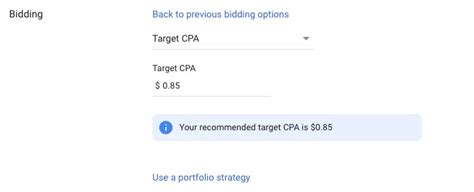
Target CPA bidding focuses on getting conversions—such as sales, sign-ups, or leads—at a specific average cost you set. You tell Google how much you’re willing to pay per conversion, and it adjusts bids to try to stay near that target. This works well if you know what a conversion is worth to your business and have some historical data for Google to learn from. For example, if you run an online fitness coaching site and are willing to pay up to $20 per new client sign-up, Target CPA will aim to get as many sign-ups as possible around that price. It’s a good fit when conversions are your primary goal and you want to control costs without micromanaging bids. However, it might not perform well if you have very few conversions or set your target CPA unrealistically low.
When should you consider Target ROAS bidding for your campaigns
Target ROAS (Return on Ad Spend) bidding aims to maximize the revenue you get from your ads relative to what you spend. Instead of focusing on cost per conversion, it targets a specific return, like $5 in sales for every $1 spent. This is useful if you sell products or services with varying values and want bidding to prioritize higher-value sales. For instance, if you own an online store with items ranging from $10 to $200, Target ROAS helps Google bid more aggressively for visitors likely to buy expensive products and less for lower-value ones. This works best if you track revenue accurately and have enough conversion data. It’s less suitable if your sales values are similar, hard to track, or if you’re new without solid performance history.
What about Maximize Clicks and Maximize Conversions—are they right for you
Maximize Clicks is an automated strategy that tries to get as many clicks as possible within your budget. It's a simple way to drive traffic, useful if your goal is awareness or website visits. But remember, more clicks don’t always mean better results—if visitors don’t convert, you could be spending money without return. Maximize Conversions aims to get the highest number of conversions for your budget without a specific cost target. It’s good for boosting sales or leads quickly when you have some conversion data for Google to learn from. The risk is it might spend your budget chasing conversions without controlling cost per acquisition, possibly leading to higher expenses. Both strategies work best with clear goals and some historical data. If you’re unsure, Maximize Clicks is simpler to start with, while Maximize Conversions can be more effective once you’ve set up conversion tracking.
Are there bidding strategies best avoided or misunderstood by beginners
Beginners sometimes pick bidding strategies without considering if they fit their goals or data availability. For example, Target CPA and Target ROAS need enough past conversions to work well; without that, they might perform poorly and waste your budget. Another common mistake is setting very low target CPAs or ROAS without realistic expectations, which can limit ad delivery or cause wasted spend. Manual bidding might seem safe, but without experience, it’s easy to set bids incorrectly and miss opportunities. Early on, avoid overly complicated strategies; start simple with automated bids until you have enough data and confidence. Also, be patient—bidding strategies take time to learn and adjust, so don’t expect instant results after changes.
How do you monitor your bidding strategy’s performance and know when to change it
Keep an eye on key metrics like cost per click (CPC), cost per conversion, conversion rate, and return on ad spend (ROAS). If costs rise without more conversions or revenue, it’s time to review your bids or targets. If impressions or clicks suddenly drop, your bids might be too low to compete. Check these metrics regularly—about once a week—to spot trends. Most automated bidding strategies need at least two weeks to adjust. If after that time results don’t improve or stray from your goals, consider tweaking your target CPA or ROAS, or trying a different strategy. Use Google Ads reports to compare performance before and after changes to understand what’s working. Monitoring and adjusting your bids is key to improving your campaign over time.
Can you mix bidding strategies across campaigns or ad groups, and why would you
Yes, you can use different bidding strategies across campaigns or even ad groups within the same Google Ads account. This lets you tailor bids to specific goals or products. For example, one campaign could focus on brand awareness using Maximize Clicks, while another aims for sales with Target CPA. Mixing strategies helps when you have varied objectives or different data levels for each area. But managing multiple strategies requires more attention to ensure each performs well and budgets stay on track. It can also make budgeting more complex if you’re not careful. The main benefit is precision: matching bidding to each part of your account’s unique goal instead of using a one-size-fits-all approach.
What are the first steps to test and optimize your Google Ads bidding strategy
First, clearly define your main goal—are you after clicks, conversions, or revenue? Then pick a bidding strategy that fits that goal and your current data. If you’re new and lack conversion data, start with automated strategies like Maximize Clicks. Set a reasonable daily budget and run your campaign for at least two weeks to collect data. Use Google Ads reports to track how your key metrics perform against your goals. If you want conversions and have some data, try Target CPA with a realistic target based on past results or industry averages. Experiment by adjusting targets or testing different strategies in separate campaigns to see what works best. Make changes gradually and one at a time so you can pinpoint what’s effective. This patient, data-driven approach helps you find the bidding method that gets the most from your budget without guesswork.
Conclusion
The best bidding strategy depends on your specific goals and the data you have available. Starting with simple automated bids focused on clicks or conversions is usually best, especially if you’re new. Avoid jumping into complex strategies like Target CPA or ROAS without enough conversion history. Regularly monitor your costs and results so you know when to adjust. Using different bidding strategies for different campaigns can work well but requires careful management. Begin by choosing one strategy that matches your current goal, test it patiently, and learn from the data. Over time, you’ll find a bidding approach that helps your budget work smarter, not just faster.
Frequently Asked Questions
What bidding strategy should I use if I want more website visitors?
Maximize Clicks is usually the best choice for driving more traffic. It automatically adjusts bids to get you as many clicks as possible within your budget. Just remember, more clicks don’t always lead to better results if those visitors don’t take further action.
Can I switch bidding strategies anytime in Google Ads?
Yes, you can switch bidding strategies whenever you want. However, it’s best to let each strategy run for at least a couple of weeks to gather data and optimize before changing. Switching too often can reset Google’s learning and make it harder to see what works.
Is manual bidding better than automated bidding?
Manual bidding gives you more control over how much you pay per click or impression, but it requires time and experience to manage well. Automated bidding uses Google’s algorithms to optimize bids based on your goals and usually works better for beginners or those wanting to save time.
When should I use Target CPA bidding?
Use Target CPA when you want conversions at a specific cost and have some conversion data for Google to learn from. It helps control how much you pay per action like a sale or lead, aligning your spend with your business value.
Can I use different bidding strategies for different products or campaigns?
Absolutely. Different bidding strategies let you tailor your approach to each campaign’s goals or products. For example, use Maximize Clicks for brand awareness campaigns and Target ROAS for revenue-focused ones. Just monitor each closely to manage your overall budget.