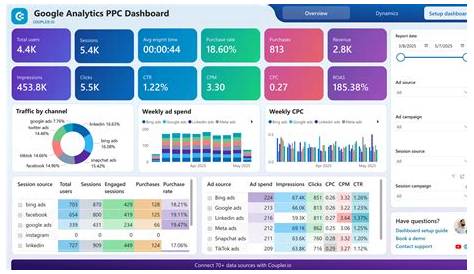
PPC advertising management is about setting up, tracking, and adjusting your campaigns so your budget drives clicks that really matter. If you’ve tried PPC but feel overwhelmed, this guide will help you organize your campaigns clearly, understand key metrics, avoid common mistakes, and optimize bids, keywords, and ads for better results. You’ll also learn how to use tools and automation to save time while keeping control.
How do I know if my PPC campaign is working?
To see if your PPC campaign is effective, focus on a few key metrics. Click-Through Rate (CTR) shows how many people clicked your ad after seeing it; a low CTR suggests your ads might not be relevant or attractive. Cost Per Click (CPC) tells you how much each click costs—if it’s too high, you might be paying for clicks that don’t convert. Conversion Rate reveals the percentage of clicks that lead to your desired action, like a sale or sign-up. Even with good CTR and CPC, a low conversion rate means your clicks aren’t bringing value. Cost Per Acquisition (CPA) shows how much you spend on average to get one conversion; if CPA is higher than your profit margin, you’re losing money. These metrics work together—sometimes a lower CTR with a high conversion rate is better than many clicks with no results. Balance these based on your goals and budget to spot when campaigns waste money or deliver real value.
What’s the best way to organize my PPC account and campaigns?
Good organization makes managing PPC campaigns much easier. Start by creating campaigns based on your main products, services, or marketing goals. Each campaign should focus on a clear theme to control budgets and target effectively. Inside each campaign, group keywords into ad groups that reflect specific customer intents or product categories. For example, if you sell shoes, have a "Running Shoes" campaign with ad groups for "Men’s Running Shoes" and "Women’s Running Shoes." This lets you tailor ads and keywords closely to what people search for, improving relevance and lowering costs. Avoid mixing unrelated keywords in one group—it makes optimization a headache. Use consistent labels for campaigns and ad groups so you can quickly check performance. This setup helps you pause or adjust parts without disrupting your whole account and makes reporting straightforward.
Which keywords should I really be targeting?
Pick keywords that match the intent of your ideal customer—those actively looking for what you offer. Use phrase and exact match types to avoid attracting unrelated clicks. Skip broad keywords like "shoes" if you specialize; instead, target more specific phrases like "men’s trail running shoes." Negative keywords are just as crucial—they block terms like "free," "cheap," or unrelated styles that waste your budget. Check your search terms report regularly to find and exclude irrelevant queries that slipped through. Including branded keywords can help if people search for your business by name. Keep refining your list by dropping poor performers and testing new keywords based on your data. This focus helps you spend on clicks most likely to convert instead of spreading your budget thin.
How do I write ads that get clicks and convert?
Your ads should grab attention and clearly explain why someone should click and take action. Use a strong headline that includes your main keyword or benefit, like "Best Men’s Trail Running Shoes." In the description, highlight key features, special offers, or what makes you unique. Include clear calls to action such as "Shop Now," "Get 20% Off," or "Free Shipping Today" to encourage clicks and conversions. Use ad extensions to add extra info like phone numbers, additional links, or locations—these often boost clickthrough rates without extra cost. Be honest and straightforward; misleading ads can get clicks but hurt conversions and waste money. Test different versions of your ads to find out what resonates best. Good ads combined with relevant landing pages smooth the path from click to sale.
What bidding strategies should I use to get the best value?
Your bidding strategy depends on your goals and how hands-on you want to be. Manual bidding lets you set bids for each keyword or ad group, giving control to prioritize certain terms or adjust as you learn. This requires more time but can be effective. Automated bidding, like Target CPA or Maximize Conversions, uses Google’s algorithms to adjust bids in real time, which can save time and sometimes improve results by responding to user signals. But automated bidding isn’t foolproof and needs monitoring to avoid overspending. A good plan is to start manual to gather data, then try automated strategies once you have enough conversions. Always watch your bids—raise them for keywords that convert well and lower or pause those that don’t. Bidding is about balancing visibility with cost control.
How often should I review and adjust my campaigns?
Regular check-ins keep your campaigns efficient without overwhelming you. Review key metrics weekly to catch big changes like cost spikes or drops in CTR and conversions. Once a month, dive deeper to adjust bids, update keywords, and refresh ads based on what the data shows. Avoid making small daily tweaks that can confuse automated bidding systems or disrupt learning. Give changes a week or two to see their effect. During special promotions or seasons, you might check more often. Sticking to a consistent schedule helps you avoid wasted spend and steadily improve results.
What common PPC management mistakes should I watch out for?
Many small business owners fall into similar traps. Ignoring negative keywords wastes money on irrelevant clicks. Not tracking conversions properly means you can’t tell if ads are working. Mixing too many keywords or unrelated themes in one campaign makes optimization hard. Setting bids too high without checking return drains your budget quickly. Focusing only on clicks instead of conversions can give a false sense of success. Forgetting to update ads or use extensions misses chances to improve results. Not reviewing campaigns often enough lets problems grow. Being aware of these pitfalls and fixing them early keeps your PPC spending efficient and effective.
How can automation and tools help without taking control away from me?
Automation saves you time by handling routine tasks like adjusting bids, suggesting keywords, or scheduling ads. Google Ads offers automated bidding, rule-based alerts, and performance reports to reduce manual work. But it’s important to set clear goals and limits so automation follows your strategy, not the other way around. For example, you can cap maximum bids to avoid overspending when using automated bidding. Reporting tools help you spot trends quickly without sifting through data. Third-party PPC platforms may offer keyword research, competitor analysis, and bulk editing to speed things up. Think of these tools as helpers that handle busywork while you make the key decisions based on what you know about your business and campaign data.
Conclusion
Focus first on getting the basics right: organize your campaigns clearly, pick keywords that match your customers’ intent, and write ads that speak to your audience. Track core metrics to see if your budget is working or draining away. Skip flashy shortcuts until your foundation is solid. Look for steady improvements in conversion rates and reasonable costs per acquisition. Adjust bids thoughtfully and regularly, and use negative keywords to stop wasting money. Automation can save time, but keep control in your hands. If PPC starts to feel too confusing or time-consuming, consider bringing in a professional. Meanwhile, start by reviewing your current campaigns and making small improvements today—this is how you make PPC a dependable part of your marketing.
Frequently Asked Questions
How much should I budget for PPC advertising?
Your budget depends on your business size, goals, and competition. Start with an amount you’re comfortable losing as you learn—often a few hundred dollars a month. Watch your results closely and adjust spending based on what delivers real conversions, not just clicks.
Can I run PPC ads myself without expert help?
Yes, many small business owners manage their own PPC successfully with some patience and learning. Focus on organizing your account well, tracking performance, and making regular adjustments. Use available tools and resources, and consider professional help if campaigns get too complex or time-consuming.
What’s the difference between manual and automated bidding?
Manual bidding means you set how much to pay per click for each keyword or ad group, giving you full control but requiring more time. Automated bidding uses algorithms to adjust bids in real time to meet goals like getting more conversions or staying within a target cost. Both have strengths and drawbacks depending on your needs and comfort level.
How do I know if my keywords are attracting the right audience?
Look at your search terms report to see the exact queries people used before clicking. If many are unrelated, add those as negative keywords. Also, check your conversion rates—higher conversions usually mean your keywords match people ready to buy.
What are ad extensions and why should I use them?
Ad extensions add extra details to your ads, like phone numbers, additional links, or location info. They make your ads more useful and visible, often increasing clickthrough rates without extra cost. Using extensions helps your ads stand out and gives customers more reasons to click.