Google PPC advertising lets you show ads in Google search results and pay only when someone clicks. It’s a powerful way for small businesses to reach customers actively looking to buy, but only if you run your campaigns carefully. This guide walks you through setting up your first campaign, choosing keywords that drive sales (not just traffic), writing ads that get clicks and convert, managing your budget to avoid overspending, tracking performance accurately, and steering clear of common mistakes that waste money.
What exactly is Google PPC advertising and why should I care?
Google PPC (pay-per-click) means you pay only when someone clicks your ad, not just for showing it. Your ads appear alongside Google search results or on websites in Google's network based on keywords you choose. You bid on those keywords, and Google runs an auction to decide which ads appear and where. The price you pay per click depends on your bid and your ad’s quality score—how relevant and useful Google thinks your ad and landing page are. PPC puts your business in front of people who are already searching for what you offer, so you can get traffic and potential sales quickly. Unlike organic search, which can take months to build, PPC gives you immediate visibility—if you target the right audience and manage your budget well.
How do I decide if Google PPC is right for my business?
Google PPC works well if your business depends on customers searching online for your products or services. It’s best when you want leads, sales, or visits that can turn into customers. PPC lets you start with a small budget and grow as you learn what works. But if your product is very niche or your audience doesn’t search much, PPC might not get many clicks. Also, if your market is competitive, bids and costs can be higher. If your sales come mostly from impulse or brand awareness rather than direct response, other advertising might suit you better. Think about your budget, goals, and where your customers look for you before starting.
What keywords should I target to get the best results?
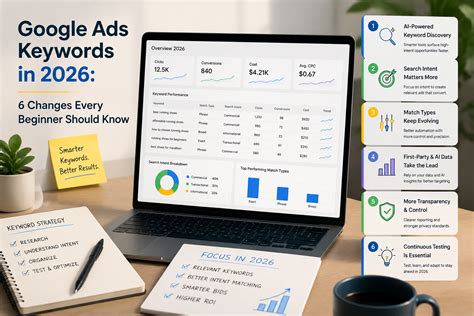
Focus on keywords your customers use when they’re ready to buy, not just words that bring traffic. Start by listing phrases someone might type when looking for your product or service, including local terms if relevant. Use Google’s Keyword Planner or free tools to check search volume and competition. Pick keywords with clear buying intent, like “buy,” “order,” or “near me.” For instance, "buy scented candles online" is better than just "candles." Avoid broad keywords that attract unqualified visitors. Also, add negative keywords—terms you don’t want your ad to show for—to stop paying for irrelevant clicks. This way, you attract visitors who are more likely to become customers.
How do I create ads that actually get people to click and buy?
Write ads that grab attention and make people want to click. Use a clear, relevant headline that matches your keywords and highlights a benefit or solves a problem. For example, "Affordable Handmade Candles - Free Shipping" tells people exactly what you offer and adds an incentive. In the description, explain what makes your product unique and include a call to action like "Shop Now" or "Order Today." Use ad extensions like phone numbers, locations, or extra links to make your ad more helpful and noticeable. Test different versions of your ads to see which wording gets better clicks and sales. Avoid vague or generic language; be specific and speak directly to your customers’ needs.
What’s the best way to set a budget so I don’t overspend?
Decide how much you’re comfortable spending each day based on your overall marketing budget. Google lets you set daily budgets so you won’t spend more than your limit on average each month. For beginners, starting small—around $10 to $20 per day—is smart. Choose your bidding strategy carefully: manual CPC lets you control bids for each keyword, while automated bidding lets Google optimize for clicks or conversions but needs some data to work well. Watch your spending and performance regularly, and pause or adjust campaigns if costs rise without results. Spread your budget evenly throughout the day so you don’t run out early and miss later opportunities.
How do I set up my first Google PPC campaign step-by-step?
First, create a Google Ads account with your Google login. Click “New Campaign” and pick your goal, like sales or website visits. Choose the campaign type—usually Search Network for text ads on Google search results. Set your target location and language to reach the right customers. Enter your daily budget and select a bidding strategy you’re comfortable with. Add the keywords you researched earlier. Write your ad headlines and descriptions to match those keywords and highlight clear benefits. Include ad extensions like call buttons or site links to make your ad more visible. Review everything and launch your campaign. After it’s live, check performance daily to catch issues and make improvements. Google’s interface helps you through each step with tips.
How can I track if my ads are working and making money?
Set up conversion tracking in Google Ads to see if your ads lead to actions like purchases, sign-ups, or calls. This usually involves adding a small piece of code to your website or linking Google Ads with your e-commerce platform. Once tracking is active, focus on metrics like click-through rate (CTR), cost per conversion, and return on ad spend (ROAS). CTR shows how well your ad gets clicks; conversions show how many people took desired actions; and ROAS compares revenue to your ad spend. Don’t just track clicks or impressions—what matters is whether those clicks turn into paying customers. Check these numbers regularly and make changes if you see low conversions or high costs.
What common mistakes should I watch out for to avoid wasting money?
Avoid targeting keywords that are too broad—these often bring clicks from people who aren’t ready to buy. Don’t skip adding negative keywords, or you’ll pay for irrelevant clicks. Weak ad copy that doesn’t clearly explain your offer or lacks a call to action can lower your click and conversion rates. Setting budgets too high or bidding aggressively without results can drain your funds quickly. Forgetting to track conversions leaves you guessing if your ads work. Also, not testing or updating your ads means missing chances to improve. Stay focused, monitor performance, and tweak your campaigns regularly to avoid wasting money.
How do I optimize and improve my campaigns over time?
Optimization means improving your ads bit by bit to get better results without spending more. Test different headlines and descriptions to find what connects best with your audience. Increase bids on keywords that perform well to get more exposure and lower bids on ones that cost too much but don’t convert. Update your keyword list by adding new buyer-intent phrases and excluding poor performers with negative keywords. Look at reports on devices, locations, and times of day to run ads where and when they work best. Review Google’s recommendations but apply them thoughtfully—some may not fit your goals. Regular reviews and adjustments keep your campaigns effective and aligned with your business needs.
What are some advanced tips and tools to get ahead with Google PPC?
Once you’re comfortable with the basics, try remarketing to reach people who visited your site but didn’t buy. This reminds interested visitors about your products and can boost conversions. Use audience targeting to show ads to specific groups based on interests or demographics. Google’s automation features like smart bidding and responsive search ads test multiple headlines and descriptions to find what works best. If you want to scale up, third-party tools can help with keyword research, bid management, and tracking across campaigns. These tools save time and provide deeper insights but require some learning. Experimenting with these advanced options can improve your PPC efficiency as your business grows.
Conclusion
Start by setting up your Google Ads account and picking a small daily budget to test your first campaign. Choose keywords that attract buyers, write clear ads with strong calls to action, and watch your spending and conversions closely. Don’t get distracted chasing every new feature—stick to the basics that bring results. A good sign you’re succeeding is when clicks turn into sales without your cost per conversion rising too much. Be patient, track your data carefully, and adjust your campaigns step by step. With consistent effort, Google PPC can become a steady source of new customers for your business.
Frequently Asked Questions
How much does Google PPC advertising typically cost?
Costs vary a lot depending on your industry, competition, and keywords. Some clicks cost just a few cents, while others in competitive markets can be several dollars. Start with a small daily budget to keep control as you learn what works.
Can I run Google PPC ads without a website?
Having a website or landing page is important because your ads need a place where people can learn more or buy. Without one, it’s hard to turn clicks into customers or track how your ads perform.
How long does it take to see results from Google PPC campaigns?
You can start getting clicks and traffic right after your ads launch. But it usually takes a few weeks of watching and adjusting before you get consistent sales and profitable campaigns.
What’s the difference between Google PPC and organic search?
PPC ads appear at the top of search results and you pay for each click, giving immediate visibility. Organic search listings are unpaid results ranked by relevance and authority, which take longer to build but don’t cost per click.
Do I need to hire a professional to manage Google PPC?
Not necessarily. Many small business owners run their own campaigns successfully by learning and being patient. But if your budget is large or your market complex, a professional might help you get better results.