Google Paid Search lets you pay to have your ads appear on Google’s search results when people look for keywords related to your business. Unlike organic search results, which show up naturally, these ads are marked with "Ad" and appear at the top or bottom of the page. This method puts your business in front of customers ready to buy or inquire, making it a smart way for small business owners new to online advertising to attract more customers without wasting money on uninterested audiences.
What exactly is Google Paid Search and how does it work?
Google Paid Search is a way for businesses to pay for their ads to appear on Google’s search results page. Unlike organic listings that appear based on Google’s ranking system, paid ads show up with the label "Ad" above or below those natural results. You pick keywords related to your products or services, and when someone searches those words, Google runs a real-time auction to decide which ads to show and their order. This auction considers how much you’re willing to pay per click (called your bid) and your ad’s quality score, which measures relevance and usefulness to the searcher. You only pay when someone clicks your ad, known as cost-per-click (CPC), so your budget goes toward actual interest, not just visibility. Once your campaign is live, your ads can appear immediately whenever someone searches your chosen keywords.
Why should I choose Google Paid Search over other advertising methods?
Google Paid Search stands out because it connects your ads directly to people actively searching for what you offer, rather than interrupting people who might not be interested. This means your budget targets audiences who already want your product or service, often leading to quicker results and clearer returns on your spend. You control your budget with daily or monthly limits, so you can start small and grow as you learn what works. Google processes billions of searches daily, giving you access to a huge potential audience no matter your niche. Compared to social media ads or traditional advertising, paid search puts your business right where customers are when they’re ready to buy.
How do I set up my first Google Paid Search campaign without getting overwhelmed?
Begin by creating a Google Ads account, which Google guides you through step-by-step. Start by choosing a clear goal—whether you want more website visits, phone calls, or store visits—because this helps Google optimize your campaign. Set a budget that fits your business; even a small daily amount can bring useful data and traffic. Choose "Search Network" for your campaign type to show text ads in search results. Set location targeting to focus on the areas where your customers live or search from. For now, stick to Google Search only to keep things simple. Focus on creating one campaign at a time to avoid confusion. Remember, you can pause or stop your campaign anytime if it’s not working as you expected.
What keywords should I target to make sure my ads reach the right people?
Pick keywords based on the words your customers would use when searching for your products or services. Start by brainstorming common search terms, then use Google’s Keyword Planner to find related keywords and see how often they’re searched. Broad keywords get more traffic but might be less targeted, while specific keywords get fewer searches but higher intent to buy. Use match types wisely: broad match shows ads for related searches, phrase match requires your keywords in order, and exact match triggers ads only for exact terms. Mixing these helps balance reach and relevance. Add negative keywords to prevent your ads from showing on irrelevant searches—for example, if you sell new shoes, add "used" as a negative keyword to avoid clicks from people looking for secondhand shoes.
How do I write ads that make people want to click?
Your ad needs to catch attention quickly among many others. Start with a headline that includes a keyword your customer is searching for. Use clear, benefit-focused language like "Free Shipping" or "24/7 Support" to show why your business stands out. In the description, expand on what you offer and include a strong call to action, such as "Shop Now" or "Get a Free Quote Today." Keep your message simple and avoid jargon since you have limited characters. Testing different versions of your ads is important to see what works best. A small change, like highlighting a special deal or unique feature, can boost clicks significantly.
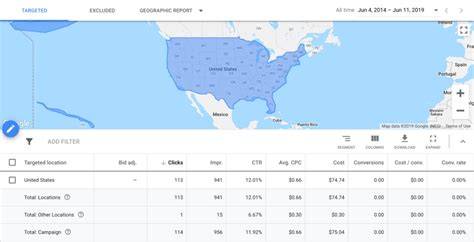
Using targeting options to reach the right audience
Google Ads offers ways to focus your ads so you don’t waste money on irrelevant clicks. Geographic targeting lets you show ads only in locations where your customers are, which is great for local businesses. Device targeting allows you to prioritize certain devices; for example, if mobile users are more likely to buy, you can bid more for those clicks. Demographic targeting filters by age, gender, or household income if your product appeals to specific groups. Audience targeting helps you reach people based on interests or past interactions, like showing ads to visitors who came to your website before (remarketing). Using these options carefully helps you spend your budget on people who are more likely to become customers. For instance, a local bakery focusing ads on nearby neighborhoods avoids paying for clicks from people too far away to visit.
What common mistakes should I avoid when running Google Paid Search ads?
A common mistake is skipping negative keywords, which can cause your ads to show on unrelated searches and waste your budget. Setting budgets too low might not give you enough data, while very high budgets without a clear plan can lead to wasted spend. Not testing different ads means missing chances to improve your messages. Also, some advertisers set campaigns and forget them, missing opportunities to improve by adjusting bids or keywords. Avoid targeting too broadly without filters to prevent clicks from people who aren’t your customers. Finally, not tracking conversions properly leaves you guessing if your ads bring real business, making it harder to optimize effectively.
How do I track whether my ads are actually working?
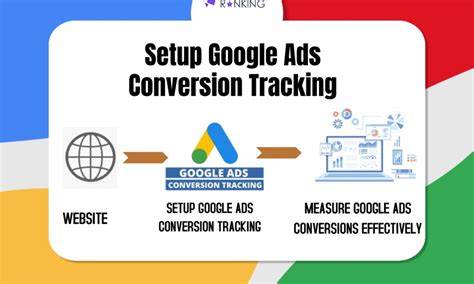
Start by setting up conversion tracking in Google Ads to see when people take actions like buying, signing up, or calling after clicking your ad. This links those actions to your campaigns and keywords, so you know what’s working. Watch key metrics like click-through rate (CTR), which shows how often people click your ad; cost per conversion, which tells you how much you spend for each desired action; and quality score, which affects your ad ranking and cost. Connecting Google Ads with Google Analytics shows what visitors do on your site after clicking, giving you even more insight. This data helps you spend your budget on ads that bring real results, not just clicks.
When and how should I optimize my campaigns for better results?
Once your ads have some data, start optimization by reviewing performance. Pause or lower bids on keywords or campaigns with low click-through rates or high cost per conversion. Use your best-performing ads as models to create new ones. Regularly add negative keywords to block unwanted traffic. Try new keywords or ad versions based on what you learn. Adjust bids by time of day or device if you see patterns in who converts better. Make changes gradually rather than all at once to keep your results steady. The goal is to improve your return on investment by focusing on what works and cutting what doesn’t.
What’s the best way to keep learning and stay updated with Google Paid Search changes?
Google Ads changes often, so staying updated helps you get better results. Start with Google’s free Skillshop courses, which cover basics and advanced strategies. Join online forums like the Google Ads Community to learn from other advertisers. Follow blogs that focus on pay-per-click (PPC) advertising for tips and case studies. Regularly review your account and try new ideas based on what you learn. Keeping curious and open to change will help your campaigns improve over time.
Conclusion
Start with a simple campaign focused on clear goals and a modest budget, using a small set of well-chosen keywords. Don’t try to cover every keyword or use complex targeting before you have data. A good sign is steady clicks from people interested in your offer and conversions that make your spend worthwhile. From there, keep testing, optimizing, and learning. Google Paid Search isn’t a quick fix, but with patience and care, it can become a dependable source of new customers for your business.
Frequently Asked Questions
How much should I budget for my first Google Paid Search campaign?
It depends on your business and goals, but starting with a small daily budget like $10 to $20 helps you gather useful data without spending too much. You can increase your budget as you identify which ads and keywords perform well.
Can I use Google Paid Search if I only serve customers in my local area?
Yes. You can target ads to specific cities, regions, or a radius around your business address, so your ads reach only people likely to visit or use your service.
What’s the difference between broad match and exact match keywords?
Broad match shows your ads for searches related to your keyword, even if the wording changes, giving wider reach. Exact match shows ads only when someone types your exact keyword or very close variations, giving you tighter control but fewer impressions.
How long does it take to see results from Google Paid Search?
You can get clicks almost right away after launching a campaign, but meaningful results like conversions often take a few days to a couple of weeks as you collect enough data to optimize.
Do I need to manage my campaigns every day?
Daily management isn’t necessary, especially when you’re starting out. Checking your campaigns every few days or weekly to review performance and make adjustments is usually enough for most small businesses.