Google AdWords PPC, now called Google Ads, lets you create ads that appear when people search for products or services like yours. You only pay when someone clicks your ad, giving you control to attract interested customers without wasting your budget. To make the most of it, you need to understand how Google’s auction and bidding system works, pick the right keywords, write ads that get clicks and conversions, and track your results carefully. This guide walks you through setting up and running campaigns that grow your business efficiently.
What exactly is Google AdWords PPC and why should I care?
Google Ads is an advertising platform where your ads appear in Google search results and across websites. "PPC" means pay-per-click—you pay only when someone clicks your ad, not just when they see it. This makes your advertising more targeted and cost-effective, especially for small businesses. You can focus your budget on people actively looking for what you offer, targeting by location, device, or time of day. Plus, you can test different ads and keywords to see what works best, rather than guessing. This level of control helps you reach the right audience and measure your results clearly.
How does the bidding system work and how do I avoid wasting money?
Google Ads uses an auction to decide which ads show for each search. When a user searches, Google ranks ads based on your bid—the maximum you’re willing to pay per click—and your ad’s Quality Score, which measures relevance and user experience. The highest bidder doesn’t always win; a well-written ad with a good landing page can outrank a higher bid. You pay only enough to beat the ad below you, not your full bid. To avoid wasting money, start with a daily budget you’re comfortable with and bid based on how much a click is worth to your business. Use bid adjustments to spend more when your ads perform well—like certain times or devices—and less when they don’t. Refine your keyword targeting to avoid irrelevant clicks. Check your spending regularly to catch surprises early.
How do I choose the right keywords so I’m not competing in the wrong spaces?
Choosing the right keywords means focusing on terms your potential customers actually use and that fit their buying intent. Broad keywords can cost more and attract people who aren’t ready to buy, while more specific keywords often cost less and bring better leads. Start by listing words related to your products or services, then use Google’s Keyword Planner to check search volume and competition. Think about the intent: are people looking to buy, compare, or learn? Keywords with words like "buy," "price," or "near me" tend to convert better. Avoid highly competitive terms dominated by big brands; niche phrases can give you better results. Add negative keywords to exclude irrelevant searches and protect your budget. Keep reviewing and updating your keywords to stay focused and efficient.
What makes a good ad copy that actually gets clicks and leads?
Good ad copy matches what users search for and highlights what makes your business unique. Use a clear headline with your main keyword or a key benefit, and a description that explains why users should click. Include a call to action like "Shop now" or "Get a free quote" to guide clicks toward your goal. Avoid vague phrases—be specific about your offer and why it matters. For example, use "Comfortable running shoes with free shipping" instead of just "Quality shoes." Keep your message within character limits so it looks good on all devices. Test different versions of your ads to find what resonates best. Make sure your ad copy matches your landing page so users find exactly what they expect, which improves your Quality Score and chances of conversion.
How do I set up my campaign structure for the best control and reporting?
A clear campaign structure helps you target the right audience and track what works. Your account holds campaigns, and each campaign can focus on different goals, locations, or budgets. Within campaigns, ad groups group related keywords and ads. For example, if you sell shoes, you might have a "Running Shoes" campaign with ad groups for "Men’s Running Shoes" and "Women’s Running Shoes." This lets you tailor ads and bids for each group and see which products perform best. Avoid putting everything in one campaign or ad group, which makes data confusing and harder to optimize. Start simple and expand your structure as you learn what works.
What’s conversion tracking and why is it non-negotiable?
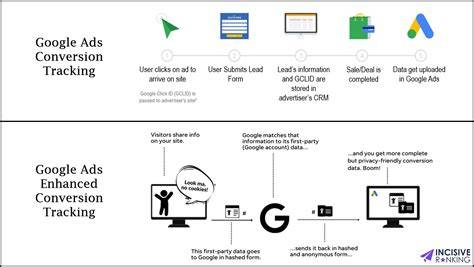
Conversion tracking lets you see what happens after someone clicks your ad—like making a purchase, filling out a form, or calling your business. Without it, you won’t know if your ads lead to real results or just clicks. Setting it up means adding a small piece of code to your website or using Google’s tools to track calls or app installs. For example, you can track when someone reaches a "Thank You" page after submitting a form. This data shows which ads and keywords bring actual customers. With conversion tracking, you can measure your return on investment and adjust bids and budgets to focus on what works. Many advertisers waste money chasing clicks alone, but conversions are what matter.
How do I interpret the key metrics and know if my campaign is working?
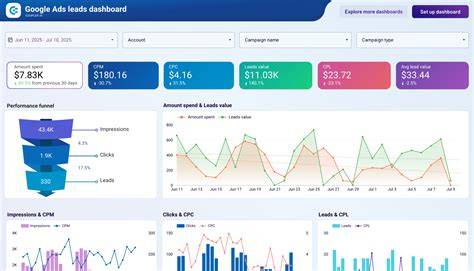
Key metrics help you understand your campaign’s performance. CTR (click-through rate) shows how often people click your ad after seeing it—a low CTR may mean your ad isn’t relevant or attractive. Quality Score measures how relevant your ad and landing page are, affecting your cost and position. CPC (cost per click) should be as low as possible, but only if those clicks lead to conversions. Conversion rate tells you the percentage of clicks that result in your goal, like a sale. If you have a high CTR but low conversions, your ad or landing page might not match what users want. If costs are high and conversions low, adjust keywords, bids, or ad copy. Look for trends over time rather than day-to-day changes to make good decisions. Together, these metrics show where to improve and if your campaign is worth the investment.
What are some common mistakes beginners make and how can I avoid them?
Beginners often start without a plan, wasting budget and getting frustrated. Common mistakes include ignoring negative keywords, which can cause irrelevant clicks. Setting bids too high or too low without knowing the value of a click wastes money. Skipping conversion tracking means you can’t tell what’s working. Overloading campaigns with too many keywords or poorly organized ad groups blurs your focus and data. To avoid this, start with a focused keyword list and negative keywords from the beginning. Keep your campaign structure simple. Monitor your spending daily at first and adjust bids based on results. Regularly review your ads and pause those that don’t perform instead of waiting for them to improve on their own.
How do I optimize my campaigns over time to get better results?
Optimizing campaigns is an ongoing process of testing and adjusting. Run A/B tests on your ad copy to see which headlines or descriptions get more clicks and conversions. Refine your keywords by pausing those that underperform and adding new ones based on real search terms. Adjust bids to spend more on keywords that convert well and less on those that don’t. Use Google’s recommendations carefully—they can help but sometimes encourage extra spending. Improve your landing pages if your Quality Scores are low. Schedule your ads to run when your audience is most active or profitable. Small changes over time lower your cost per conversion and improve ROI. Keep an eye on new Google Ads features that can automate or simplify optimization, but add these tools gradually and watch their impact closely.
What are some advanced tips or tools that can help me level up my AdWords game?
Once you’re comfortable with the basics, you can try advanced features to improve your campaigns. Remarketing shows ads to people who visited your site but didn’t convert, reminding them of your business. Ad extensions add details like phone numbers, locations, or extra links, making your ads more helpful and noticeable. Automated bidding strategies, like Target CPA or Maximize Conversions, use Google’s machine learning to adjust bids in real time for better results without manual changes. Audience targeting lets you reach specific demographics or interests beyond keywords. Use these tools carefully—add them one at a time and track how they affect your results before relying on automation fully.
Conclusion
Start with a simple campaign focused on clear goals, relevant keywords, and well-written ads that match what your customers want. Set up conversion tracking—it’s the only way to know if your ads bring real business. Avoid spending heavily before you understand what works. Look for steady clicks turning into leads or sales at a cost that fits your margins. Learn from your data, adjust bids and keywords carefully, and try advanced features gradually when you’re ready. With patience and attention, Google Ads can become a steady source of new customers for your business.
Frequently Asked Questions
How much should I budget for Google AdWords PPC as a small business?
There’s no one-size-fits-all answer, but starting with a modest daily budget you’re comfortable with—often $10 to $50 per day—is smart. This lets you gather data without risking too much. Increase your budget as you find keywords and ads that convert well.
Can I run Google Ads without a website?
You can run ads directing people to a phone number, app, or Google My Business listing, but having a website makes it easier to provide information and track conversions. Without a website, optimizing your ads is more limited.
What’s the difference between broad match and exact match keywords?
Broad match shows your ads for searches related to your keyword, including synonyms and variations, giving more impressions but less precise targeting. Exact match triggers ads only when the search exactly matches your keyword or very close variants, offering tighter control but fewer opportunities.
How long does it take to see results from Google Ads?
You can get clicks right after launching your campaign, but meaningful results like conversions depend on your setup and industry. Usually, it takes a few weeks to collect enough data to optimize effectively.
Is it better to manage Google Ads myself or hire a professional?
Managing your own campaigns saves money and gives you full control if you have time to learn and experiment. Hiring a professional can speed up results and handle complexity but costs more. Many small businesses start on their own and bring in help as their campaigns grow.