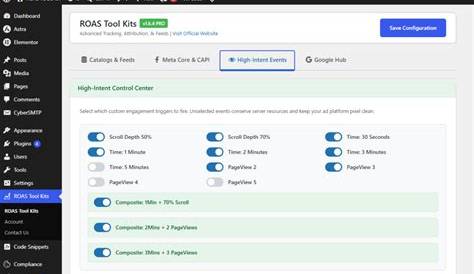
Yes—ROAS Tool Kit may let you adjust how long UTM-tagged visits are retained or credited, but you should verify the controls in your own workspace before changing a report. Not every account has a freely editable “UTM persistence” setting; available options can depend on your plan, workspace configuration, connected store, and tracking implementation. Before reporting campaign results, confirm whether your account stores the original tagged visit, the latest tagged visit, or uses a defined conversion lookback rule. Those are related behaviors, but they are not the same thing. Check the setup, test it with real tagged links, and document the rule you use. That preparation can save you from an awkward “why do Meta and ROAS Tool Kit disagree?” conversation later.
Can you actually change UTM persistence in ROAS Tool Kit?
Possibly, but verify it at the account level rather than assuming it is available across every ROAS Tool Kit setup. “UTM persistence” can refer to how long a source is stored, whether the first or latest tagged source is retained, or how far back a conversion can receive credit. Your workspace may offer a control for one of those behaviors without letting you change all of them.
In your ROAS Tool Kit workspace, look for settings related to attribution, tracking, source, cookies, conversions, or reporting. Also check connected-store settings, custom storefront configurations, implementation partners, and connected analytics tools. The relevant behavior may be configured outside the campaign-reporting screen.
Review your plan and permissions as well. Some products restrict attribution settings to workspace owners or administrators. Others apply a standard rule to all customers, with support able to confirm or alter parts of the implementation. If you cannot see a setting, that does not mean UTM data is not retained; it may simply mean the retention logic is not editable from your current view.
The key question is not only, “Can I set this to 30 days?” Confirm what ROAS Tool Kit retains, how long it retains it, and which source receives credit when an order occurs. A longer retention period can associate more orders with earlier paid clicks, but it can also make a paid channel look more influential than your reporting policy intends.
Before sharing results, save the current setting or confirmed default in your reporting notes. If documentation or support confirms that the rule is fixed, apply that rule consistently instead of trying to rebuild a different model in a spreadsheet.
Before you change anything, make sure you mean UTM persistence
UTM persistence means retaining campaign information from a tagged visit so it can be connected to a later session or conversion. It is not automatically the same as browser cookie duration, an ad platform attribution window, or a report date range.
A browser cookie lifetime describes how long a browser may retain an identifier or stored value. That can support UTM persistence, but it does not define the full attribution rule. A cookie can remain available for a long time while reporting logic credits only conversions within a shorter window. Consent choices, browser controls, and implementation details can also limit what remains available.
An ad platform attribution window is the period during which that platform may claim credit after an ad interaction. Google Ads and Meta can use their own click-view rules, identity signals, and modeled conversions. Changing a ROAS Tool Kit setting will not usually change the attribution window inside those ad platforms.
A reporting lookback period is different again. A report covering the last 30 days determines which conversions appear in the report; it does not necessarily change how long an earlier UTM can be linked to a conversion. Marketers sometimes shorten a report date range expecting attribution to shorten too, then find that older campaign visits still receive credit.
Keep the distinctions clear: UTM persistence asks whether the source is still known; attribution determines which known source gets credit; a cookie setting affects whether stored information remains available in the browser; and the report range determines which conversions are displayed.
The setting you are looking for may not be called “UTM persistence”
- Attribution settings or attribution model
- First-touch, last-touch, or multi-touch attribution
- Source retention or campaign retention
- Tracking cookie, visitor cookie, or cookie duration
- Conversion window or attribution window
- Lookback window
- UTM capture, campaign tracking, or source rules
Check workspace settings first, followed by store, pixel, checkout, and tracking configuration areas. If your account connects to a commerce platform, inspect the connected-store settings too. Some source values are captured on landing pages but passed through checkout or order systems through a separate mechanism.
Read each field description instead of relying on its name. A “lookback window” may control reporting credit rather than raw UTM storage. A “tracking cookie duration” may control browser recognition without determining whether first touch or last touch receives credit.
If no relevant setting appears, ask support a specific question. Include the workspace name, connected platform, and the behavior you need confirmed: “Does this implementation retain first-touch UTMs after a later tagged visit? If so, for how long?” That is more useful than asking generally whether UTMs are supported.
Avoid changing cookie duration, attribution model, and reporting window at the same time. Make one documented adjustment, run a controlled test, and then decide whether the setup matches your reporting policy.
Decide whether the first source or the latest source should win
The most important choice is often the crediting rule, not the retention period. First-touch attribution preserves the original known acquisition source. Last-touch attribution credits the latest eligible tagged source before conversion. Each answers a different business question.
For example, a shopper first clicks a Facebook ad tagged with utm_source=facebook and utm_campaign=spring-prospecting. They browse, leave, return several days later through a Google paid search ad tagged with utm_source=google and a branded campaign, and then buy.
Under a first-touch rule, Facebook remains the credited acquisition source because it introduced the shopper. Google may still be stored as a later interaction, depending on the implementation, but it does not replace Facebook in a first-touch report. Under a last-touch rule, Google receives credit because it was the latest eligible tagged interaction before the order.
Neither result is automatically wrong. Problems arise when a report describes last-touch revenue as “Facebook performance” in one place and first-touch revenue as “Facebook performance” somewhere else. Those are different measures. First touch is useful for judging which campaigns introduce new customers; last touch can help show which channel closed or re-engaged a buyer.
Some setups retain both original and latest UTMs. That gives you the option to report acquisition and conversion-assist perspectives separately, but do not assume both fields exist simply because UTMs are captured. Verify the available fields in the dashboard, export, or order-level record.
For the Facebook-to-Google example, use first touch when the client needs to understand where new-customer demand began. Use last touch when they need to know which tracked click immediately preceded purchase. If both matter, show both with clear labels rather than forcing one number to answer two different questions.
Pick a retention period that fits how your customers buy
Choose a retention rule around the buying cycle rather than a universal industry number. The window should be long enough to capture realistic consideration and return visits, but not so long that an old click receives credit after it has stopped being a meaningful explanation for the purchase.
For short-consideration purchases, a shorter rule often makes sense: replenishable products, low-friction offers, or products commonly bought soon after discovery. If most genuine decisions happen quickly, a very long window can let an early paid click claim orders driven mainly by later activity, repeat purchasing, or another campaign.
Considered ecommerce products generally need more room. Higher-priced products, bundles, products requiring sizing or comparison, and gift purchases may involve several sessions before checkout. A short rule can undercount the channel that first brought a serious prospect to the site.
Longer B2B-style sales cycles need extra care. A prospect may read a paid-content landing page, return after an email nurture sequence, attend a demo, and convert much later through a sales process. UTMs can still be useful as an acquisition record, but treating the initial paid click as the sole reason for all eventual revenue can overstate paid-channel performance. If your setup supports it, separate sourced pipeline, influenced pipeline, and last-touch conversion reporting.
Use your own patterns: time between first visit and purchase, the role of repeat customers, and the number of channels commonly involved. State what the chosen window means. For example: “This report credits first known paid acquisition when the order occurs within the selected source-retention rule.” Keep the rule stable during a reporting period, and annotate any mid-quarter change so attributed-revenue movement is not mistaken for campaign improvement.
Know what can overwrite a customer’s original UTM data
Original UTM data can disappear, be replaced, or fail to reach an order record for reasons unrelated to campaign quality. Knowing the common paths makes it easier to diagnose a shift before telling a client that a channel stopped working.
Direct visits can be handled differently by different implementations. Some systems preserve the prior non-direct source when someone types the URL or uses a bookmark. Others record the later session as direct, especially when source data is not retained correctly. Test this in your own account rather than assuming direct traffic always overwrites, or always preserves, an earlier UTM.
Under a last-touch rule, a new paid campaign can replace a prior source. Email and referral links can do the same, particularly when they carry UTMs or are configured as eligible attribution sources. That can be correct for last-touch reporting, but it can hide original acquisition when first-touch data is not stored separately.
Checkout redirects are another common issue. A shopper may leave your store for payment, financing, authentication, or another checkout domain and return. Without complete cross-domain tracking or parameter passing, the return can look like a new direct or referral session. The same issue can occur when a landing page, store, cart, and checkout use different domains or subdomains.
Consent choices matter as well. If a visitor declines non-essential tracking, or if the implementation waits for consent before storing tracking data, UTM retention may be reduced or absent. Browser privacy features can have a similar effect.
Keep link hygiene tidy. Use consistent source, medium, and campaign naming, and avoid adding fresh acquisition UTMs to internal links because they can overwrite the source you intended to measure.
Why the same customer can still look like two different people
UTM persistence is usually browser- and device-dependent. It can help connect a returning visitor’s activity, but it cannot guarantee that every session from the same person becomes one recognized customer record.
If someone clicks a tagged ad on a work laptop and buys later on a phone, the phone may have no access to UTM data stored in the laptop browser. The same applies when someone clears cookies, uses private browsing, changes browsers, or blocks storage. The tracking system can treat each visit as a new person.
App-to-web handoffs can create another break. A shopper might see an ad in an app, open a browser later, and complete checkout there. Unless the handoff preserves relevant identifiers and campaign data in a supported way, the browser session may not connect cleanly to the original interaction.
Logged-in experiences can sometimes help a business connect activity at the customer level, but a login does not resolve every attribution question. Timing of identification, consent state, platform integrations, and the specific ROAS Tool Kit implementation all matter. A customer may be known at purchase while the earlier ad interaction remains unavailable or ineligible for credit.
Read the dashboard as a structured measurement system, not a complete diary of every customer decision. Paid social can introduce customers who later return on another device through search, email, or direct traffic. A channel with strong last-touch numbers can also be collecting demand created elsewhere.
Use consistent UTMs and a tested persistence rule, while making room for these limits in stakeholder discussions. Browser-level tracking should not be presented as person-level certainty.
Test your rule with a real click path before trusting the dashboard
Find attribution problems before launch with a controlled path that mirrors normal shopper behavior. You need a few clearly tagged visits, a way to identify the test order or conversion, and enough time for ROAS Tool Kit to process the event.
A separate browser profile can help create a clean test. Use an incognito window only if you understand that private browsing may limit storage. A clean standard browser profile is often easier for testing persistence because you can inspect the same returning session. Record the exact URLs, timestamps, and expected outcome before you begin.
A practical sequence looks like this: 1. Visit your site through a tagged test link for a first channel, such as a Facebook-style URL with distinctive test campaign values. 2. Browse without converting. Confirm that the landing page loads normally and that the relevant tracking is firing according to your usual validation method. 3. Leave the site, then return through a second tagged link representing another channel, such as Google. 4. Complete a test purchase or trigger the conversion event your reporting uses. Mark the order clearly if your store allows test identifiers. 5. Check ROAS Tool Kit after its normal processing delay. Look for the recorded source, campaign, conversion value, and any first-touch or last-touch fields available. 6. Repeat with a direct return, an email-style tagged return, and, if relevant, a cross-domain checkout path.
The result should match the rule you selected. For a first-touch rule, the Facebook test source should remain credited after the Google return. For a last-touch rule, Google should receive credit. If both values are retained, confirm which field contains each one.
Document failures precisely. “UTMs are broken” is hard to act on; “the first source is captured on the landing page but becomes direct after checkout on a second domain” gives your technical team or support a useful starting point.
Compare ROAS Tool Kit results with your ad platforms without expecting a perfect match
ROAS Tool Kit, Meta, Google Ads, and analytics platforms can report different conversion totals for the same campaign without any one system being automatically wrong. They can measure the same commercial activity through different identity methods, attribution rules, and reporting windows.
An ad platform may credit a conversion after an ad click or view under its own configured window and account settings. It can also use platform-level signals that a browser-based UTM system does not have. ROAS Tool Kit may instead rely on captured UTM parameters, store order data, and its own source-crediting rule. Analytics tools may use session-based rules, channel grouping logic, or different event definitions.
Time zones matter too. A conversion near midnight can fall on a different reporting date across systems. Refund handling, taxes, shipping, discount treatment, subscription revenue recognition, and deduplication can also create revenue differences even when conversion counts are close.
Do not keep changing UTM persistence until dashboards match. First compare definitions: what counts as a conversion, what revenue is included, which window applies, and whether the model is first touch, last touch, click-through, view-through, or another approach.
Choose a primary source for each decision. You might use ROAS Tool Kit for a consistent store-level, UTM-based performance view and ad platforms for delivery diagnostics and platform-native optimization. In reports, state the distinction: “Platform-reported conversions use platform attribution; ROAS Tool Kit uses the workspace’s configured source logic.” Consistency over time is more useful than artificial agreement across systems.
Write down your attribution rule so future reports stay honest
Once you have confirmed and tested the configuration, record it somewhere the team can find. Attribution settings tend to become invisible background machinery until a number changes and everyone asks why.
- The source of truth used for the report, such as ROAS Tool Kit workspace reporting
- The attribution rule, such as first-touch or last-touch
- The UTM or source-retention period, if your account exposes and confirms one
- What can overwrite a source, including later tagged visits, email, referrals, or direct returns where applicable
- Any known exceptions, such as consent restrictions, cross-domain checkout behavior, or device switching
- The date and result of the latest test click path
- The report language used with stakeholders
Be specific about metric definitions. “Paid social ROAS” can mean revenue from customers first acquired through paid social, revenue from orders whose final tracked visit was paid social, or platform-attributed revenue. Those are not interchangeable, so label the metric with its underlying rule where space permits.
If you change the rule, keep the old documentation and note the effective date. Do not compare periods as though they used the same model when they did not. In a client report, a short explanation is enough: “Attribution logic changed this month, so channel-level comparisons with earlier reports are directional.”
The goal is not the largest possible ROAS number. It is a number your team can explain, reproduce, and use to make a better decision.
Conclusion
First, confirm what your ROAS Tool Kit workspace actually stores and credits. Do not assume a single universal “best” UTM window, and do not change a cookie setting, platform window, or report range simply because the label sounds familiar. Choose a first-touch or last-touch rule based on the decision the report needs to support, then use a retention period that reflects the buying cycle without stretching paid credit too far. Before launch, run a controlled two-channel test, save the result, and describe the rule plainly in stakeholder reports. The goal is not perfect agreement with every ad platform. It is a repeatable rule that measures the behavior you intend to measure and makes its limits clear.
Frequently Asked Questions
Can I change the UTM attribution window in ROAS Tool Kit?
It may be configurable, depending on the controls available in your plan, workspace, and tracking implementation. Check settings for attribution, source retention, cookies, or lookback windows, then confirm whether the field changes UTM storage, conversion credit, or both before using it in reporting.
Does increasing cookie duration also increase UTM persistence?
Not necessarily. A longer cookie lifetime may let a browser retain information longer, but conversion credit can still use a separate attribution rule or window. Confirm both storage behavior and crediting behavior in your ROAS Tool Kit setup.
Will a later Google ad click overwrite a Facebook UTM?
It can under a last-touch rule. A first-touch rule may preserve Facebook as the original acquisition source, while some implementations retain both original and latest values. Check which source field your ROAS report uses.
Why does ROAS Tool Kit show fewer conversions than Meta or Google Ads?
The systems can use different attribution windows, identity signals, conversion definitions, time zones, revenue treatment, and crediting models. A difference does not automatically mean your UTMs are failing; compare the measurement rules before trying to reconcile totals.
How do I verify UTM persistence before sending a client report?
Use two tagged test links in sequence, return through the second channel, and complete a test conversion. Then check which source and campaign ROAS Tool Kit records, along with any first-touch and last-touch fields available in your workspace. Repeat the test with direct, email-style, and cross-domain checkout paths where relevant.