You can track a variety of customer actions with the Meta Conversion API, including standard events like purchases and leads, custom events unique to your business, and offline events such as in-store sales. Unlike the Meta Pixel, which relies on the browser and can be blocked or limited, the Conversion API sends data directly from your server to Meta, providing more reliable tracking. This article explains which events you can track, how to choose the most important ones for your goals, the technical differences between browser and server tracking, common challenges, and how to test your setup.
What exactly is the Meta Conversion API and why does it matter?
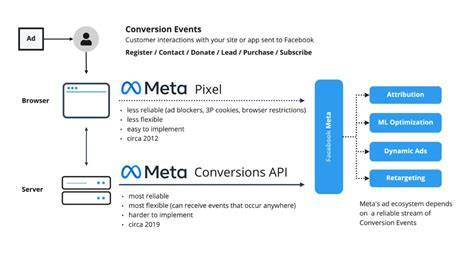
The Meta Conversion API sends customer event data directly from your server to Meta, bypassing the browser. While the Meta Pixel runs in the user’s browser and can be blocked by ad blockers or limited by privacy settings, the Conversion API captures events more reliably because it communicates from your backend. For example, if someone completes a purchase but has an ad blocker enabled, the pixel might miss that event, but the API can still report it. It works alongside the pixel rather than replacing it, combining browser and server data for a fuller, more accurate view. This setup is especially useful for improving ad targeting, measuring conversions accurately, and tracking actions beyond your website, like offline sales or CRM updates.
Which standard events can I track using the Conversion API?
Meta supports several standard events that represent common customer actions, making it easier to measure key points in your sales process. These include Purchase (completed sales), Lead (potential customers showing interest), AddToCart (adding products to a shopping cart), InitiateCheckout (starting the checkout process), and ViewContent (visiting important pages like product details). Tracking these standard events helps Meta optimize your ads toward valuable outcomes, such as finding people more likely to buy or sign up. Because these events are predefined, Meta automatically understands and uses them without extra setup. Reporting these events through the Conversion API ensures your data reaches Meta even if browser tracking fails.
Can I track custom events and what does that look like?
Yes, you can track custom events with the Conversion API to capture actions unique to your business that standard events don’t cover. For example, you might track newsletter signups, specific product feature interactions, or loyalty program enrollments. You create a custom event name and send relevant data through the API. For instance, a subscription box service might define a "SubscriptionStarted" event to know when someone commits. Custom events offer flexibility but need clear definition and communication to Meta. They may not trigger automatic optimization or reporting, so you might use them alongside standard events or set up custom conversions to get the most benefit.
What about offline events or events from other platforms?
The Conversion API can also send offline events like in-store purchases or phone orders, which is helpful if your business operates across multiple channels. For example, if a customer sees a Facebook ad and then buys in your retail store, you can upload that sale data through the API to attribute it correctly. You can also integrate data from your CRM or other platforms, syncing actions like appointment bookings or lead status updates. To do this, you map your offline data to Meta’s event structure and follow privacy rules. Including offline events gives you a more complete picture of your ad impact beyond just clicks and website visits.
How do I decide which events are most important for my business?
Focus on events that align closely with your business goals. If your revenue depends on sales, prioritize Purchase events. If you generate leads, then Lead events or form submissions matter more. Think about the stages in your customer journey you want to influence—awareness, interest, decision, or loyalty—and choose events that provide meaningful signals for ad optimization and measurement. Avoid tracking too many minor actions that clutter your data. It’s better to start with a few high-value events that are easier to implement and test. Over time, you can adjust your event list based on what gives useful insights or helps improve your ad campaigns.
What’s the difference between browser pixel events and Conversion API events?
Browser pixel events rely on JavaScript running in the user’s browser to track actions, which means they can be blocked by ad blockers, browser privacy settings, or slow connections. This can cause underreporting or missing data. Conversion API events come from your server directly to Meta, bypassing the browser environment. This server-side tracking is more reliable and less likely to lose data. The API can also send richer information from your backend to improve matching and attribution. Using both together is usually best: the pixel captures real-time user interactions, while the API fills in gaps and handles offline or backend events.
Are there any limitations or challenges I should watch out for?
One common issue is event duplication—if both the pixel and Conversion API report the same event without proper deduplication, your data may appear inflated. Meta recommends including an event ID with each event to prevent this. You also need to comply with privacy laws like GDPR or CCPA by handling user consent carefully when sending data server-side. Setting up the API involves backend work and mapping your data correctly, so developer help is often necessary. Some real-time or highly interactive events might be harder to capture server-side, so choose which events fit best with each tracking method.
How can I test that my events are being tracked correctly?
Meta’s Event Manager lets you monitor incoming events in real time and check whether your Conversion API events are firing as expected. The Test Events feature allows you to send test data and confirm it appears correctly with all parameters. Make sure your events show up without duplication and that data like currency and value is consistent. Also review your ad reporting to verify conversions attributed to your API events. Testing early and regularly helps catch problems before they affect your campaigns or reporting.
What’s a simple example of setting up a Purchase event with the Conversion API?
Suppose you run an online store and want to report purchases via the Conversion API. First, your server collects purchase details like order ID, amount, and customer email (hashed for privacy). Then, it sends an API call to Meta’s endpoint with an event object containing fields such as "event_name": "Purchase", "event_time": the purchase timestamp, "event_id" for deduplication, and "user_data" with hashed identifiers. Here’s a simplified example of the event data:
{ "event_name": "Purchase", "event_time": 1685635200, "event_id": "order123", "user_data": { "em": "hashed_email_here" }, "custom_data": { "currency": "USD", "value": 59.99 } }
Your server sends this JSON to Meta’s Conversion API endpoint with authentication. After setup, check Meta’s Event Manager to see if purchase events arrive correctly. Your real implementation might include more details or additional user identifiers.
Where to get help or learn more about advanced setups?
Start with Meta’s official documentation for detailed guides, API references, and troubleshooting. The Meta for Developers site offers comprehensive instructions and sample code. For community support, visit Facebook’s Business Help Center and developer forums to ask questions and learn from others. If you have complex needs like integrating multiple data sources or handling privacy compliance, consider consulting professionals experienced with Meta advertising technology. Keep an eye on Meta’s announcements for updates or new features related to the Conversion API.
Conclusion
Begin by identifying the customer actions that matter most to your business goals—these are your priority events to track with the Conversion API. Don’t try to track everything at once; start with a few standard events like Purchase or Lead, then add custom or offline events as needed. Use both the pixel and Conversion API together to get the most complete data, but make sure to handle deduplication. Test your setup early using Meta’s Event Manager to confirm your events fire correctly. A well-configured Conversion API setup can improve your ad targeting and measurement, helping you make better decisions without unnecessary data or technical headaches.
Frequently Asked Questions
Can I track events from mobile apps using the Meta Conversion API?
Yes, you can track events from mobile apps through the Conversion API, but it usually requires integrating your app backend with Meta’s API or using SDKs designed for mobile tracking. The API complements app events by sending server-side data for actions the app might miss.
Do I need a developer to set up the Conversion API?
Most setups require developer help because the API involves backend access and coding to send events correctly. However, some platforms offer plugins or integrations that simplify this process.
How does the Conversion API handle user privacy and consent?
The Conversion API uses hashed user data and requires you to follow privacy laws like GDPR and CCPA. You should get proper user consent before sending personal information and only share data you’re authorized to use. Managing consent is crucial for server-side tracking.
Can I track multiple events in one Conversion API request?
Yes, you can send multiple events in a single API request by bundling them into an events array. This reduces the number of calls, but each event still needs proper formatting and unique IDs for deduplication.
Will the Conversion API replace the Meta Pixel completely?
No, the Conversion API works best alongside the pixel. While it can capture many events independently, using both ensures you don’t miss user interactions blocked on the browser side and provides richer data for ad optimization.