If you’ve just started running ads on Meta platforms like Facebook and Instagram, the best way to know if your ads are working is to track metrics that directly connect to your goals—whether that’s increasing awareness, getting people to visit your website, or making sales. Focus on key performance indicators (KPIs) like conversions, reach, and engagement instead of getting lost in every number Meta shows you. This approach helps you see if your ads are reaching the right people, grabbing their attention, and driving the outcomes your business needs.
What’s the main goal of my Meta Ads campaign?
Before checking any numbers, define what success means for your campaign. Are you aiming to build brand awareness, encourage people to visit your website, or drive sales? Your goal determines which metrics matter most. For example, if brand awareness is your focus, track Reach and Frequency to see how many people saw your ad and how often. If your goal is sales, focus on conversions—actions like purchases or sign-ups that happen after someone clicks your ad. Without a clear goal, it’s easy to track irrelevant data that won’t help you understand your real progress.
Which Meta Ads metrics show if my ads are reaching the right people?
To check if your ads are reaching your intended audience, look at Reach, Impressions, and Frequency. Reach tells you how many unique people saw your ad, Impressions count how many times your ad appeared (including repeat views), and Frequency shows how often each person saw your ad on average. Ideally, you want high Reach with a moderate Frequency so your ad spreads widely without overwhelming viewers. But keep in mind, reaching many people doesn’t guarantee success—what matters is reaching people who are interested and relevant to your business.
How do I know if people are engaging with my ads?
Engagement metrics like Click-Through Rate (CTR), Likes, Comments, and Shares reveal how your audience interacts with your ads. CTR shows the percentage of people who clicked your ad, indicating initial interest. Likes and Comments reflect how your message connects emotionally or sparks conversation, while Shares suggest your content is strong enough to spread on its own. Remember, though, engagement alone doesn’t confirm business results—someone might like or comment without taking the next step, like buying or signing up. Still, these metrics help you understand if your creative and message resonate with your audience.
Why aren’t clicks alone a good measure of success?
Clicks are easy to track and tempting to focus on, but a high number of clicks doesn’t always mean your ads are working. People might click out of curiosity or by mistake and then leave without doing anything valuable. If you optimize only for clicks, you risk paying for traffic that doesn’t convert, wasting your budget without increasing sales or leads. Instead, pay attention to what happens after the click—are people completing the actions that matter most to your business? Clicks are part of the picture but don’t tell the full story.
Which metrics prove my ads are driving business results?
To see the real impact of your ads, focus on conversion-related metrics. Cost Per Acquisition (CPA) tells you how much you spend on average to get one customer or lead. Return on Ad Spend (ROAS) shows how much revenue your ads generate compared to what you spend, helping you understand profitability. Tracking specific conversion events—like purchases, sign-ups, or downloads—lets you know if your ads are prompting meaningful actions. These metrics connect your advertising directly to business outcomes, making them the most valuable signs of success. Without conversion tracking, you won’t have a clear picture of your ad’s return on investment (ROI).
How do I track conversions accurately on Meta?
Accurate conversion tracking starts with installing the Meta Pixel on your website. This small piece of code collects data on how people behave on your site after clicking your ads. You can customize it to track specific actions like purchases, sign-ups, or adding items to a cart. Setting up custom conversions lets you define exactly which actions count as success for your business, so you measure what matters. Without this setup, your data might be incomplete or misleading. Take time to configure your Pixel and conversion events properly for reliable insights into your campaign’s performance.
What role does attribution play in understanding my ad performance?
Attribution is how Meta assigns credit for conversions based on when and how users interacted with your ads. Meta uses attribution windows—like 1-day click or 7-day click plus 1-day view—to decide if a conversion should be credited to your ad. Knowing how attribution works helps you interpret your results correctly. For example, a sale might be credited to an ad click from several days ago rather than the last ad someone saw. Attribution can get complicated if customers interact with multiple ads or marketing channels before converting. Understanding Meta’s attribution helps you avoid misreading your campaign’s effectiveness.
Should I look at metrics outside Meta Ads Manager?
Meta Ads Manager gives detailed data about your ads, but it doesn’t show everything about how your ads affect your business. Tools like Google Analytics provide a broader view of customer behavior across your website and other marketing channels. They help you track the full customer journey, including sales that happen after people leave Meta platforms. Combining data from Meta and external tools gives you a clearer picture of how your ads fit into your overall marketing and where you can improve. Relying only on Meta’s metrics might miss important context about what your customers do next.
What are common mistakes people make when interpreting Meta Ads metrics?
A frequent mistake is focusing too much on vanity metrics like impressions or likes without connecting them to real business goals. High engagement doesn’t always mean profit. Another error is ignoring audience quality—lots of clicks from the wrong people won’t help your bottom line. Many also look at metrics in isolation, missing how they relate to each other and your campaign goals. Finally, some don’t set up proper tracking, so their data is incomplete or misleading. Always link your metrics back to what you want to achieve, and consider the bigger picture to avoid these pitfalls.
How do I set up a simple dashboard to monitor my most important Meta Ads metrics?
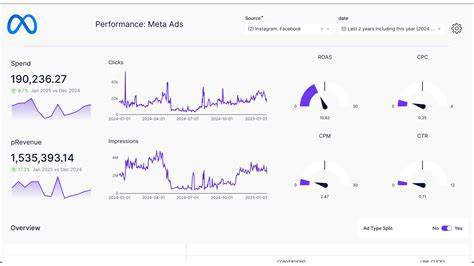
Choose a few key metrics that match your campaign goals—like Reach and Frequency for awareness, CTR and Engagement for interest, and CPA or ROAS for conversions. Use Meta Ads Manager’s reporting tools to build a custom dashboard that updates automatically, so you can check your progress easily without wading through raw data. Keep your dashboard simple to avoid feeling overwhelmed; tracking too many numbers can confuse rather than clarify. Regularly reviewing this dashboard helps you spot trends early and make smarter choices about your ads or budget. The goal is steady, focused monitoring to keep your campaigns on track.
Conclusion
Start by defining what success looks like for your Meta Ads campaign—whether that’s growing brand awareness, increasing website visits, or making sales. Then focus on the metrics that directly connect to those goals instead of chasing every number Meta shows you. Set up proper tracking with the Meta Pixel to measure conversions accurately, and remember that clicks or engagement only tell part of the story. Watch out for common mistakes like overvaluing vanity metrics or ignoring who’s actually clicking your ads. Finally, create a simple dashboard with a few key indicators to check regularly if your ads are doing what you want. A good result means your ads aren’t just seen and clicked—they’re actually helping your business grow.
Frequently Asked Questions
What is the most important metric to track for sales-focused Meta Ads?
If your goal is sales, the most important metrics are Cost Per Acquisition (CPA) and Return on Ad Spend (ROAS). They show how efficiently your ads turn clicks into paying customers and whether your ad spend is profitable.
Can I rely only on Meta Ads Manager metrics to measure my ad success?
Meta Ads Manager provides useful data, but it’s best to use it alongside tools like Google Analytics. These tools track customer behavior beyond Meta platforms and give a fuller picture of sales and conversions.
Why is it important to set up Meta Pixel on my website?
The Meta Pixel tracks what visitors do on your site after clicking your ads. This lets you measure conversions accurately. Without the Pixel, you won’t have reliable data on whether your ads lead to important actions like purchases or sign-ups.
Is a high click-through rate (CTR) always a good sign?
Not always. A high CTR means many people clicked your ad, but it doesn’t guarantee they took valuable actions afterward. It’s important to see whether those clicks lead to sales or other goals.
How does attribution affect how I interpret my ad results?
Attribution decides which ad interactions get credit for conversions based on timing. Understanding attribution windows helps you avoid mistakes—like thinking the most recent ad led to a sale when it was actually an earlier one. This helps you evaluate your ads more accurately.