
If you’ve noticed that the numbers from your analytics tool don’t match what you see in your CRM or sales platform, you’re not alone. This happens because these systems track and report data differently—they’re designed for distinct purposes and use different methods. Your analytics tool captures user behavior on your website or app, often anonymously, while your CRM records leads and customers as they engage with your sales process. Knowing why these differences occur will help you interpret your data more confidently and avoid confusion when making decisions.
Why do my analytics and CRM numbers never quite match?
Analytics tools and CRMs serve different functions, so they collect and report data in fundamentally different ways. Analytics platforms measure user interactions—page views, clicks, and sessions—often tracking anonymous or partially identified visitors as they browse your site. CRMs focus on actual contacts or customers, usually after someone submits a form or completes a purchase. This means a single user might appear multiple times in analytics sessions but just once as a lead or customer in your CRM. Additionally, each system defines conversions and customers differently, so their counts won’t line up exactly. Understanding these differences helps you see that it’s not about one source being right or wrong, but about recognizing the unique perspective each provides.
Are we even tracking the same things?
A major source of discrepancy is that analytics and CRMs often track different events. Analytics tools focus on user behavior on your digital properties—pageviews, clicks, sessions—using cookies or device IDs to follow users whether or not they identify themselves. CRMs track leads, contacts, and customers—people who have provided identifiable information or completed transactions. For example, your analytics might report 10,000 sessions in a week, but your CRM only shows 200 new leads because only a small fraction of visitors fill out forms or buy something. So the numbers aren’t directly comparable: analytics reflects potential interest, while the CRM captures qualified prospects.
How do attribution models change the reported results?
Attribution models decide which marketing touchpoints get credit for a conversion, and different tools often use different models or time windows. Your analytics might use last-click attribution within a 30-day window, crediting the last interaction before conversion during that time. Your CRM or sales platform might use first-touch attribution or a different timeframe. For instance, if a user clicked a Facebook ad 25 days ago but converted after an email reminder today, analytics could credit the email, while your CRM might credit the original Facebook click. These differences in attribution logic can cause numbers to diverge significantly.
Does time zone or reporting period matter here?
Time zones and reporting periods can shift reported numbers in subtle ways. If your analytics tool uses UTC but your CRM operates on your local time zone, conversions recorded near midnight may fall on different days in each system. Similarly, if analytics reports on calendar weeks but your CRM uses rolling 7-day windows or fiscal periods, totals won’t match up. Even a few hours' difference in time zone settings can move counts between days, creating apparent mismatches when comparing reports side by side. This is a common but often overlooked cause of discrepancies.
What role do data syncing delays and updates play?
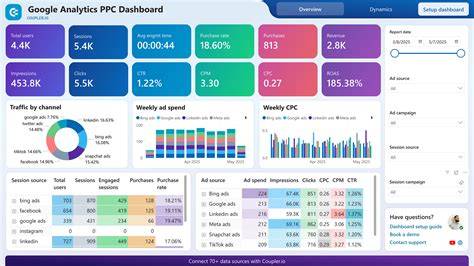
Data syncing between analytics and CRM systems rarely happens instantly. Your CRM might import data from analytics, or vice versa, on schedules ranging from hourly to daily or less often. When you check reports in real time, some conversions or leads may not have synced yet, causing temporary gaps. Data processing delays can also occur if filtering, enrichment, or validation steps happen behind the scenes. For example, a lead captured on your website might appear in your CRM an hour or more later. These delays usually disappear over time, but comparing data too soon can lead to mismatches. Waiting for syncing to complete before analysis helps reduce confusion.
Could duplicate or missing user IDs be skewing the data?
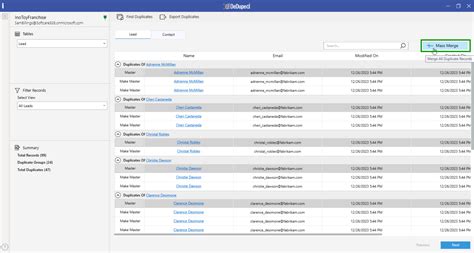
User identification is a tricky area that often causes discrepancies. Analytics tools typically rely on cookies or device IDs, which users can delete or block, leading to the same person being counted multiple times. CRMs depend on explicit identifiers like emails or phone numbers submitted during lead capture. If a user submits multiple forms with different emails or leaves fields blank, your CRM may create duplicate or incomplete records. Conversely, if users block tracking cookies, analytics might undercount visits. These differences in how users are identified and counted can skew numbers, making it seem like there are more or fewer leads or sessions than there really are.
Why might filtering or data cleansing differ between systems?
Each system applies its own rules to clean and filter data. Analytics platforms often exclude known bots, internal traffic, or spam clicks, while CRMs remove invalid contacts and duplicates. These rules vary, so what one system filters out might still appear in another. For example, your analytics tool might exclude visits from your company’s IP address, but your CRM could still record form submissions from internal users. These differences in data hygiene affect reported counts and mean direct comparisons can be misleading unless you understand each tool’s filtering methods.
Is one tool more ‘correct’ than the other?
Neither tool is inherently more correct—they simply serve different purposes. Analytics tools excel at capturing anonymous user behavior and measuring website or app engagement at scale. CRMs focus on tracking real people as they become leads, customers, and repeat buyers. Because of these distinct goals, each system uses definitions, tracking methods, and reporting frameworks suited to its role. Expecting perfect alignment isn’t realistic. Instead, think of each as offering a different view of your data, and use both together to get a fuller picture of your marketing and sales performance.
How can I better align my analytics and CRM data?
Start by standardizing definitions across your team—agree on what counts as a lead, conversion, or session before comparing numbers. Align time zone settings and reporting periods between tools. Use reliable user identification methods, like email-based tracking when possible, to reduce duplicates. Set up regular syncing schedules and give enough time for data to update before running reports. Document filtering and cleansing rules so you know what data each system excludes. Regular data audits can catch mismatches early and help you adjust processes for better consistency.
What should I focus on instead of perfect number matching?
Trying to get exact number matches between analytics and CRM often wastes time. Instead, focus on trends and actionable insights over time. Pay attention to how metrics move rather than fixating on daily counts. Use analytics to understand user behavior and channel performance, and CRM data to gauge lead quality and sales progress. When you understand why the numbers differ, you can interpret each in context instead of getting stuck on discrepancies. This approach leads to smarter, more confident marketing and sales decisions without unnecessary frustration.
Conclusion
Perfect alignment between your analytics tool and CRM isn’t realistic because they’re designed for different purposes and use distinct data models. Focus on standardizing key definitions, syncing time zones and reporting periods, and allowing time for data to update before analysis. Don’t get caught up in short-term numeric differences caused by syncing delays or filtering rules—these usually even out. Instead, watch broader trends and use the combined insights to understand user behavior and sales results. When you grasp why discrepancies happen, you’ll feel more confident using both data sources to guide your decisions rather than forcing them to match exactly.
Frequently Asked Questions
Why are my website analytics showing more visitors than leads in my CRM?
Analytics tools count all visitors or sessions, including those who don’t become leads. Your CRM only records leads when someone submits their information, so it naturally shows fewer numbers.
Can different attribution models cause big differences in reported conversions?
Yes. If your analytics and CRM use different attribution models or time windows, they’ll assign credit for conversions differently, leading to variation in reported numbers even for the same leads or sales.
How do time zones affect data comparisons between tools?
If analytics and CRM use different time zones, conversions near midnight can be assigned to different days, causing apparent mismatches in daily or weekly totals.
Why might duplicate records in my CRM cause confusion with analytics data?
Duplicates in your CRM inflate lead counts because one person may be recorded multiple times. Analytics tools typically group users by cookies or device IDs, so they might count that person differently, creating mismatched numbers.
Is it better to rely on analytics or CRM data for marketing decisions?
Neither is better on its own; they serve different roles. Use analytics to understand user behavior and channel performance, and CRM data to track lead quality and sales progress. Together, they give a more complete picture.