If you use UTM parameters to track your marketing campaigns, you might worry they could hurt your site's SEO or Google rankings. The truth is, UTM parameters themselves don’t directly affect your SEO or search rankings. However, if not managed properly, they can create duplicate content issues that may dilute your SEO value. Understanding how UTM parameters work and how to handle them correctly lets you track your campaigns effectively without risking your SEO.
Do UTM parameters hurt my SEO or search rankings?
UTM parameters are tracking tags added to URLs to see where visitors come from, but they don’t directly impact your SEO rankings or how Google ranks your site. Google recognizes these parameters as tracking tools and usually treats the base URL without parameters as the main version for ranking. The real issue arises if your site allows search engines to index multiple versions of the same page with different UTM parameters. This can split ranking signals across those URLs, which may weaken your SEO performance. Proper site setup, like using canonical tags and managing URL parameters, helps prevent these problems.
What exactly are UTM parameters and why do we use them?
UTM parameters are small bits of text added to the end of a URL to help marketers track the source and effectiveness of their campaigns. They begin with a question mark and include keys such as utm_source, utm_medium, and utm_campaign. For example, www.example.com?utm_source=newsletter&utm_medium=email&utm_campaign=spring_sale shows that a visitor came from a newsletter email promoting a spring sale. These tags give marketers detailed insights about which channels and campaigns drive traffic and conversions, helping them measure ROI and improve future efforts.
How can UTM parameters cause duplicate content problems?
The main SEO challenge with UTM parameters is that they create multiple URLs leading to the same page content. For instance, your homepage might be accessible at www.example.com and also at www.example.com?utm_source=facebook&utm_medium=cpc. Search engines see those as different URLs even though the content is identical. If multiple versions get indexed, ranking signals like backlinks and user engagement may be spread thin across URLs. This fragmentation can lower the overall ranking potential of the page compared to having all signals focused on one URL.
What is URL canonicalization and how does it solve UTM issues?
Canonicalization tells search engines which URL is the preferred or "canonical" version of a page. Adding a canonical tag in your page's HTML header that points to the clean URL without UTM parameters signals that all UTM-tagged URLs are just variants of the same page. This consolidates ranking signals, avoids duplicate content problems, and ensures search engines index only the preferred URL. Without canonical tags, search engines might index multiple URLs, splitting your SEO value. Setting canonical URLs is a straightforward and effective way to keep UTM parameters from harming your SEO.

Can Google Analytics and other tools handle UTM parameters without SEO damage?
Google Analytics and similar analytics tools are designed to track UTM parameters without affecting SEO. When someone clicks a UTM-tagged link, the analytics tool reads those parameters to correctly attribute the session, but this doesn’t change how Google indexes or ranks your pages. Tracking happens on the client side or through server logs, so these tools safely collect campaign data without creating SEO risks. The key is to ensure your site and search engines don’t index multiple UTM-tagged URLs as separate pages, which is a separate issue from analytics tracking itself.
What are noindex tags and should they be used with UTM URLs?
Noindex tags tell search engines not to show a page in search results. While using noindex on UTM-tagged URLs might seem like a way to avoid duplicate content, it’s usually not the best choice. Applying noindex means search engines won’t index those URLs, but if these URLs are linked or shared often, it can cause crawl inefficiencies or lost link equity. Instead, using canonical tags to point to the main URL lets search engines crawl UTM URLs without indexing them separately. Noindex tags are better reserved for low-value or thin content pages rather than for tracking URLs.
How can I set up Google Search Console and Robots.txt to manage UTM URLs?
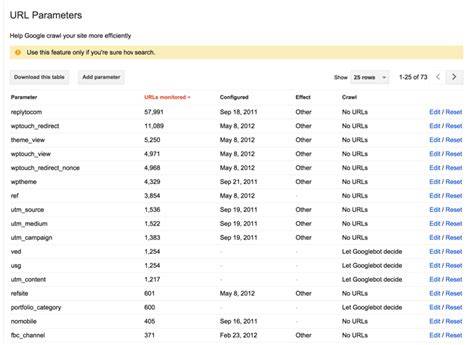
Google Search Console offers a URL Parameters tool where you can tell Google how to handle parameters like UTM tags. You can specify that these parameters don’t change the page content, so Google can avoid crawling multiple URL variants unnecessarily. This reduces crawl waste and duplicate content issues. You can also block crawling of URLs with certain UTM parameters using your robots.txt file, but blocking means Google won’t see those URLs at all, which might interfere with how it understands your site. Usually, the best approach is to configure URL parameter handling in Search Console and use canonical tags on your pages for a balanced solution.
Are there better ways to track campaigns without risking SEO issues?
If you want to avoid any SEO risks from UTM parameters, there are alternatives. Server-side tagging collects campaign data on your server instead of adding parameters to URLs. You can also use first-party cookies or session storage to remember where visitors came from without changing the URL. Some analytics platforms track campaigns through referrer data or hidden fields rather than URL modifications. These methods keep your URLs clean and eliminate the risk of duplicate content or indexing issues.
How to audit your website for UTM parameter SEO risks?
To check if UTM parameters cause SEO issues, start by searching for indexed URLs with UTM tags in Google Search Console’s Coverage report or by using site:yourdomain.com queries with common UTM parameters. Use crawling tools to find duplicate content from URL variations. Verify whether canonical tags are set correctly on pages with UTM parameters. Look at server logs or analytics to see if Googlebot crawls many UTM-tagged URLs unnecessarily. Finally, review your URL parameter settings in Search Console and test any robots.txt rules you have. This audit helps you identify where SEO value might be split and what fixes you need.
Conclusion
Make sure your site uses canonical tags pointing to clean URLs without UTM parameters. Configure URL parameter handling in Google Search Console to tell Google which parameters don’t change page content. Avoid noindexing UTM URLs unless absolutely necessary, and be cautious with blocking crawling via robots.txt. UTM parameters themselves don’t hurt SEO, but unmanaged duplicate URLs can. Regularly monitor your indexed URLs and crawl reports. When managed correctly, you’ll get accurate campaign tracking without sacrificing search rankings or confusing search engines.
Frequently Asked Questions
Do UTM parameters lower my website’s search rankings?
No, UTM parameters themselves don’t lower search rankings. Google usually ignores them for ranking purposes. Issues only happen if many URLs with UTM tags get indexed separately, causing duplicate content problems.
Should I block UTM parameters in robots.txt?
Blocking UTM parameters in robots.txt can stop Google from crawling those URLs, but it may prevent Google from seeing important page signals. It’s generally better to use canonical tags and configure URL parameters in Google Search Console instead.
Can I rely on Google Analytics to track UTM campaigns safely?
Yes, Google Analytics and similar tools track UTM parameters without affecting SEO. They use the tags to attribute traffic correctly but don’t change how search engines index or rank your pages.
Is using noindex tags on UTM URLs a good idea?
Usually, noindexing UTM URLs isn’t recommended because it can cause crawl inefficiencies and loss of link equity. Canonical tags are a better way to handle duplicate content caused by UTM parameters.
What’s the best way to prevent SEO problems from UTM parameters?
Use canonical tags pointing to clean URLs, set up URL parameter handling in Google Search Console, monitor indexed URLs for duplicates, and consider alternatives like server-side tracking to keep URLs clean.