To keep your product feed accurate and up to date with inventory and pricing changes, start by linking your inventory system or database directly to your product feed. This connection lets you update stock levels and prices quickly, either in real time or on a set schedule. Doing this keeps your listings consistent across all sales channels, prevents overselling, and avoids pricing errors that could confuse customers or hurt your ad campaigns.
Why does updating my product feed matter for inventory and pricing?
Keeping your product feed accurate with current inventory and pricing is crucial for sales and customer trust. If your feed lists items as available when they're out of stock, customers will face cancellations or refunds, which can damage your reputation. Similarly, outdated prices can mislead shoppers and undermine confidence. For advertising, incorrect prices might cause your ads to be disapproved or waste your budget. Regularly updating your feed ensures your listings reflect what you actually have and what customers will pay.
What systems or tools do I need to update my product feed?
Most e-commerce platforms—like Shopify, Magento, WooCommerce, or BigCommerce—offer built-in tools or apps to manage product feeds. Marketplaces and ad platforms such as Google Merchant Center, Facebook Shops, and Amazon Seller Central rely on these feeds to show your products. You might also use inventory management software or databases that handle stock and pricing separately. To update your feed smoothly, you need access to your product data source and the tools that push updates to your sales channels. Sometimes plugins or third-party services act as bridges between your inventory system and your feed destination.
How do I connect my inventory data to my product feed?
Connecting your inventory data depends on your setup. If you track inventory in a database, you can export it as a CSV or XML file formatted to match your product feed. For example, you could schedule a script to pull stock data and update a CSV feed your sales channels read. Platforms like Shopify often offer direct integrations or apps that sync inventory and pricing automatically. If you keep inventory in Excel, you can convert your lists into the required feed format and upload manually or automate the process. APIs provide another method—if your system supports them, you can send real-time updates directly to your feed provider, cutting down delays and errors.
How often should I update my feed to reflect inventory and pricing changes?
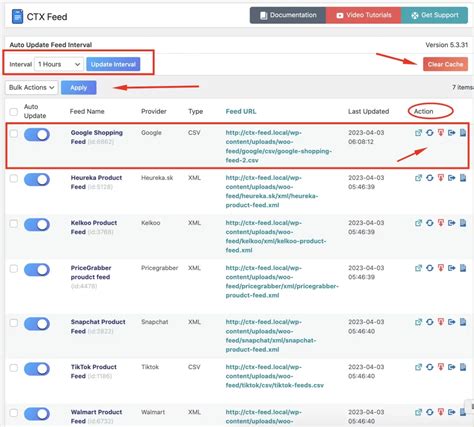
Update frequency depends on your sales volume, product turnover, and platform capabilities. Real-time updates are best for fast-moving items or promotions because they reduce overselling and pricing mismatches, but they require more technical effort and stable integrations. Hourly updates offer a balance between freshness and system load. Daily updates may be enough for slower-moving products or predictable changes. The key is weighing how fresh your data needs to be against the complexity of your setup. Pick an update schedule that fits your sales pattern and how critical accurate data is to your business.
What formats and fields are required for updating inventory and pricing?
Product feeds usually come in CSV, XML, or API formats. Each sales channel has specific requirements, but key fields typically include product ID or SKU, available quantity, price, sale price (if applicable), and currency. The "availability" field often indicates if a product is in stock, out of stock, or backordered. Pricing fields should reflect the current amount customers pay, including discounts. Missing or misnamed fields can cause your updates to fail or display wrong information. Always check the documentation for each sales channel to ensure your feed matches their exact specifications.
How do I avoid common errors that cause feed updates to fail?
Feed update failures often come from incorrect field mapping, missing required fields, invalid data formats, or file encoding problems. For instance, mixing up price and sale price or leaving availability blank are frequent mistakes. Uploading feeds with broken XML syntax or corrupted CSV formatting can also cause rejections. To fix these issues, validate your feed file against platform schemas or use diagnostic tools provided by your sales channels. Make sure your product IDs match existing listings and all required fields are present and formatted correctly. Avoid manual edits that might introduce hidden characters or formatting errors, and if you automate updates, check error logs regularly.
How can I test and verify that my product feed updates are working correctly?
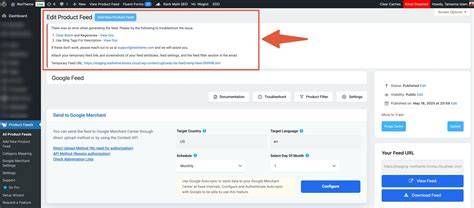
Before going live, use preview and diagnostic tools from your sales channels or feed management software to check your feed. Platforms like Google Merchant Center let you upload test feeds and highlight errors or warnings. Verify that inventory and pricing appear as expected and that no products are missing or duplicated. Comparing your feed data to your source inventory confirms accuracy. Running small test uploads or using staging environments helps catch problems without affecting your live listings. After updates, keep monitoring to spot issues early.
What are some tips to automate feed updates and reduce manual work?
Automation saves time and cuts errors. You can use scheduled scripts or cron jobs that export inventory data and update your feed regularly. If your systems support APIs, setting up direct integrations lets you push near-instant updates when stock or prices change. Third-party feed management tools can sync data across multiple channels and handle format conversions automatically. Whichever method you pick, add error alerts so you get notified if updates fail. Automation means less manual uploading, fewer mistakes, and more time for other tasks.
How do pricing changes affect product visibility and ad campaigns?
Keeping prices current in your feed is essential for marketing and customer experience. If prices in your feed don’t match your website, customers might get confused or frustrated, leading to lost sales. Ad platforms may disapprove or limit ads with outdated prices, hurting your visibility. When running sales or promotions, updating your feed quickly ensures discounts show in ads and listings, driving more traffic. Delayed price updates can waste ad spend or miss opportunities. Align your feed updates with pricing changes in your store to keep everything consistent.
What should I do if I notice discrepancies between my inventory and product feed?
If your feed shows inventory levels different from your actual stock, start by checking your source inventory data. Make sure recent sales, returns, or stock adjustments are recorded correctly. Next, review how your feed is generated—ensure it pulls the latest data and isn’t using outdated caches or files. Check for errors in your export or upload process that might cause stale information. If you use automation, confirm your update scripts or integrations run on schedule without errors. Finding and fixing the root cause quickly keeps your listings accurate and your customers happy.
Conclusion
Begin by setting up a reliable link between your inventory system and product feed, then choose an update schedule that fits your business needs. Focus on the key fields your sales channels require and validate your feed to catch errors early. Automate updates where possible to reduce manual work and keep your data accurate. If you spot mismatches between inventory or pricing and your feed, trace back to the source data and update process to fix the root cause. Consistently accurate feeds help your customers shop easily and keep your ads running smoothly, making your daily work less stressful and your store more trustworthy.
Frequently Asked Questions
Can I update my product feed automatically without manual uploads?
Yes. Many platforms and tools support automated feed updates through scheduled exports, API integrations, or third-party services. Setting this up reduces manual work and keeps your data current.
How quickly do inventory changes need to be reflected in my product feed?
It depends on your sales speed and platform needs. Fast-selling items or promotions benefit from real-time or hourly updates. Slower-moving products might only need daily updates.
What happens if my feed shows incorrect pricing?
Incorrect pricing can confuse customers, cause lost sales, or lead to ad disapproval. Updating your feed promptly with correct prices avoids these problems and keeps your marketing effective.
How can I check if my product feed has errors before publishing?
Use preview and diagnostic tools from your sales channels or feed management software. These tools highlight missing fields, formatting issues, and other errors so you can fix them before going live.
Why does my feed show different stock levels than my actual inventory?
Discrepancies usually come from delays in syncing, outdated data exports, or automation errors. Check your source data and update process to make sure your feed pulls the latest inventory information.