Creating effective product pages on WordPress means combining clear, persuasive descriptions with high-quality visuals and simple navigation—all optimized for search engines and mobile devices. The goal is to make visitors feel confident about your products and guide them smoothly to purchase. WordPress provides flexible tools to help you write descriptions that speak directly to your customers, showcase your products with great images and videos, organize information for easy browsing, and improve your pages’ visibility online. With the right setup, your product pages can build trust, reduce hesitation, and increase sales.
What makes a product page effective on WordPress?
An effective product page on WordPress attracts attention, answers visitors’ questions, and encourages them to buy while reflecting your brand’s personality. Essential parts include a clear product title, a prominent call-to-action button, and descriptions that focus on how the product benefits the buyer instead of just listing features. WordPress’s drag-and-drop blocks and page builders let you design layouts that lead visitors naturally from curiosity to confidence. Adding customer reviews or FAQs provides social proof and eases doubts. Fast loading speeds and mobile-friendly design—which depend on your theme and hosting—help keep visitors engaged. The page should look professional and trustworthy, with consistent fonts, colors, and uncluttered layouts supported by high-quality images. When these elements come together smoothly on WordPress, visitors are more likely to become customers.
How do I write product descriptions that actually sell?
Write product descriptions on WordPress that speak directly to your ideal customer in clear, simple language. Instead of just listing features, explain what those features mean for the buyer—how the product solves a problem or improves their life. For example, say "Soft, breathable fabric that keeps you comfortable all day" rather than just "100% cotton." Use short paragraphs or bullet points to make the text easy to scan in WordPress’s block editor. Match your tone to your audience—friendly and casual for lifestyle items, professional and precise for technical products. Avoid jargon unless your customers expect it. Use active verbs and sensory details to make descriptions vivid. If you sell many products, keep descriptions consistent in style and length by creating reusable blocks in WordPress. Clear, benefits-focused descriptions help visitors imagine using the product, which encourages them to buy.
What kinds of images and videos should I add to my product pages?
High-quality images are essential. Use clear, well-lit photos showing the product from several angles. In WordPress, upload optimized images to keep your pages fast—choose JPEG or WebP formats and keep file sizes under 200 KB when possible. Plugins like Smush or ShortPixel can compress images without losing quality. Videos increase engagement by showing the product in action or highlighting features. Embed videos from YouTube or Vimeo to avoid slowing your site, or use plugins that support video galleries. Avoid autoplay videos since they can annoy visitors and reduce page speed. If your product comes in different colors or sizes, include images for each option to help buyers decide. Use WordPress blocks or plugins to create galleries or sliders that display multiple images without cluttering the page.
Which WordPress plugins can help improve my product pages?
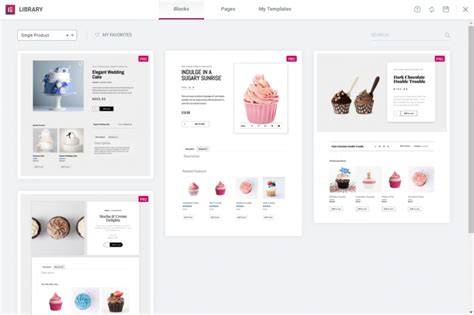
Several WordPress plugins can improve your product pages without requiring coding. WooCommerce is the most popular choice for selling products, managing inventory, payments, and shipping. To add customer reviews and star ratings, use plugins like WP Customer Reviews or Site Reviews, which build trust. For better galleries, Envira Gallery or NextGEN Gallery offer customizable image and video displays. Ultimate FAQ helps add frequently asked questions to reduce support requests. Tabby Responsive Tabs or Accordion Blocks let you organize product details into tabs or accordions that work well with the WordPress editor. Choose plugins carefully—too many can slow your site—so pick reliable, regularly updated ones that fit your needs.
How can I organize product details so visitors don’t get overwhelmed?
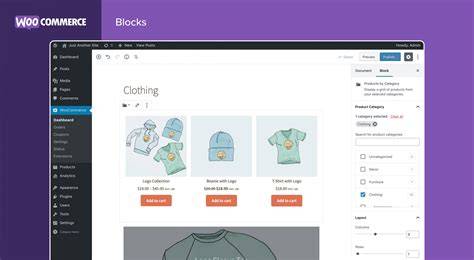
Organize your product pages to help visitors find information quickly without feeling lost. Use WordPress’s block editor to divide details into sections like tabs or accordions that hide less important information until clicked. This keeps the page tidy. Bullet points work well for features or specs, making them easy to scan. Put key info like price and main benefits near the top. Common tabs might include description, specifications, reviews, and shipping details. Accordions work well on mobile where screen space is tight. Avoid long, unbroken text or too many images clustered together. Consistent headers and spacing across your product pages help visitors know where to look and make your site feel familiar. The goal is to provide enough detail for confident buying decisions without overwhelming readers.
How do I optimize product pages for search engines within WordPress?
Optimizing product pages for SEO helps people find your products through search engines. Use plugins like Yoast SEO or Rank Math to edit page titles, meta descriptions, and other metadata inside WordPress. Choose keywords your customers actually use and include them naturally in product titles, descriptions, and image alt text. Alt text also improves accessibility and image search results. Keep URLs short and descriptive without extra characters. Make sure your product pages are included in your XML sitemap, which SEO plugins usually generate automatically. Write unique descriptions for each product instead of copying manufacturer text or other sites to avoid duplicate content. Also, ensure your pages load quickly and use HTTPS, both important for SEO and building customer trust.
How can I make my product pages mobile-friendly?
Most visitors will view your product pages on mobile devices, so they need to look good and load quickly there. Pick a responsive WordPress theme that adjusts layouts for different screens automatically. Test your pages using Google’s Mobile-Friendly Test or by checking them on various phones and tablets. Make buttons and links large enough to tap easily, and avoid pop-ups that cover content on small screens. Optimize images to load fast, since slow pages frustrate mobile users more than desktop ones. Use plugins that support responsive design for galleries and other features. Break long content into smaller sections or tabs so mobile visitors can navigate quickly. A clean, simple mobile layout keeps people browsing longer and encourages purchases.
What are some common mistakes to avoid on WordPress product pages?
Avoid cluttered layouts that cram too much information or too many visuals, which can confuse visitors and push them away. Don’t use long paragraphs without breaks or mix too many fonts and colors that distract from your product. Missing key details like price, shipping, or return policies can cost you sales and increase support questions. Slow loading times caused by uncompressed images, too many plugins, or poor hosting will make visitors leave quickly. Copying generic product descriptions hurts both SEO and customer trust. Overusing pop-ups or autoplay videos often annoys visitors instead of helping. Lastly, ignoring mobile optimization means missing a big chunk of potential customers. Fix these issues by simplifying your design, optimizing images, and regularly testing your site speed.
How do I use analytics to improve my WordPress product pages?
Analytics show how visitors interact with your product pages, helping you improve them based on real data. Start by setting up Google Analytics, and if you use WooCommerce, check its built-in reports. Watch metrics like bounce rate, average time on page, and conversion rate to see if visitors engage and complete purchases. If a product page has high bounce rates or low sales, try changing descriptions, images, or layout to see if it helps. A/B testing plugins let you compare different versions of your pages to find what works best. Look for where visitors drop off during the buying process—maybe your call-to-action isn’t clear or the page loads slowly. Reviewing data regularly helps you focus on changes that improve sales and the overall experience.
What’s a simple checklist to launch or update my product pages confidently?
Start by writing clear, benefits-focused descriptions that speak directly to your customers. Add high-quality, optimized images and videos showing your product from different angles. Use WordPress blocks or plugins to organize details into tabs, accordions, or bullet points for easy reading. Install essential plugins like WooCommerce for sales and a review plugin to build trust. Optimize your pages for SEO with a plugin to manage metadata, keywords, and alt text. Test your pages on mobile devices to ensure they look good and load quickly. Keep your design simple by limiting colors, fonts, and excess content. Finally, set up Google Analytics or WooCommerce reports to track visitor behavior and sales. This checklist helps you create product pages that engage visitors and boost conversions with confidence.
Conclusion
Focus first on the heart of your product pages: clear descriptions and quality images that answer your customers’ questions and show the product’s value. Don’t feel pressured to use every plugin or fancy feature—choose what fits your products and audience best, and keep your design simple and easy to navigate. Avoid overloading pages with too much information or effects that slow your site down. A good product page keeps visitors engaged, helps them interact with your content, and guides them smoothly to purchase. Once your pages are live, use analytics to see what’s working and make improvements. This ongoing attention pays off with steady growth and more sales.
Frequently Asked Questions
How important are product descriptions on WordPress product pages?
Product descriptions are essential because they explain why someone should buy your product. On WordPress, clear, benefit-focused descriptions help visitors quickly understand your product, which increases the chances they’ll make a purchase.
Can I use any WordPress theme for my product pages?
You can use any theme, but it’s best to pick a responsive one that adapts well to mobile devices and has clean layouts. This ensures your product pages look professional and work well on all screen sizes.
What’s the best way to add customer reviews on WordPress product pages?
Use a dedicated review plugin or the review features built into WooCommerce. These let you show customer feedback with star ratings, which builds trust and helps potential buyers feel confident.
How do I make sure my product images don’t slow down my WordPress site?
Optimize images before uploading by compressing them with tools or plugins like Smush. Use the right file formats (JPEG or WebP) and avoid uploading oversized images to keep your pages loading quickly.
Should I include videos on my product pages?
Videos are helpful for showing your product in use or explaining features. Embed videos from YouTube or Vimeo to keep your WordPress pages fast and avoid hosting large video files directly on your site.